Running Multiple Companies on QuickBooks? There's a Reason It Hurts
August 10, 2026By Ryland Beardmulti-entity accountingmulti-company reportingconsolidation
Here's a pattern we see constantly. Somebody starts a business, and it does well. So they start another one, or an LLC per property, or a holding company, because that's what accountants and attorneys sensibly tell them to do. Then they open QuickBooks and discover the fine print of their success: every entity is a separate subscription, a separate login, and a separate set of books that will never, ever talk to each other.
Ask QuickBooks a simple question like "how did we do last month, all together?" and the answer is silence. Not because the data isn't there. Because the product was never built for people who own more than one thing.
The monthly ritual nobody signed up for
If you have multiple entities on QuickBooks today, the end of your month probably looks like this: log into company one, export the P&L. Log into company two, export the P&L. Repeat until finished or demoralized. Paste everything into a master spreadsheet, line up the accounts that don't quite match, fix the formulas someone broke last month, and produce one fragile consolidated report with a shelf life of about thirty days.
Bookkeeping firms feel this most of all, multiplied across every multi-entity client. We know because we are one: Switchbooks was built inside a bookkeeping firm that got tired of doing exactly this. If you're weighing every option, our guide to combining financial reports without spreadsheets walks through the alternatives. This article is about the option we ended up building.
What "multi-entity" should actually mean
Plenty of tools promise consolidated reports. Most of them work by syncing data out of each QuickBooks file into a dashboard, which means you keep paying for every subscription, you inherit a sync that can quietly fail, and the report you get is read-only. If a number looks wrong, the dashboard can't fix it. The books are still five separate silos underneath.
We think multi-entity accounting only counts as solved when three things are true:
1. One login, every entity. Not five tabs and a password manager. You open your books and see all of your companies, or all of a client's companies, in one place.
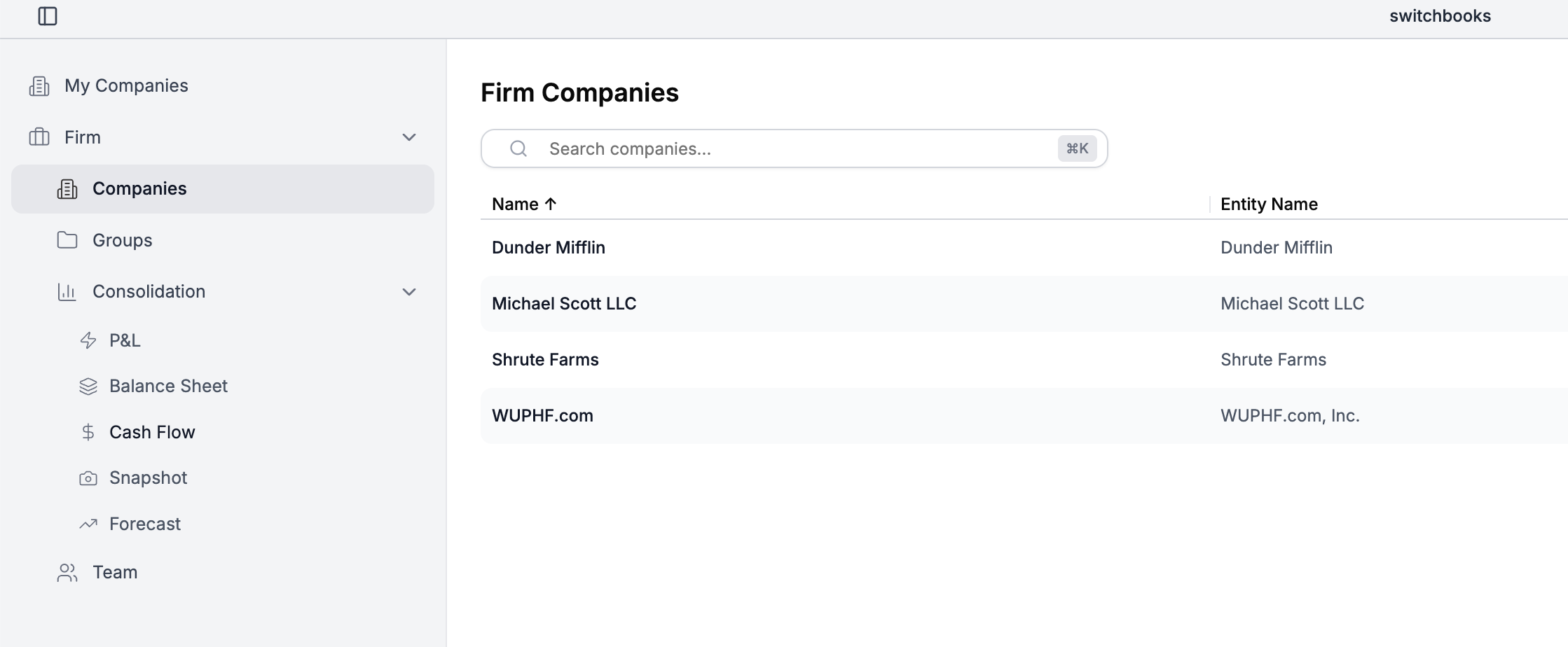
2. Consolidation is a view, not a project. Select the entities, click once, and read a consolidated P&L or balance sheet with each company in its own column beside the total. No exports. No syncing. No monthly ritual. The report isn't assembled from copies; it's the ledger itself, viewed from above.
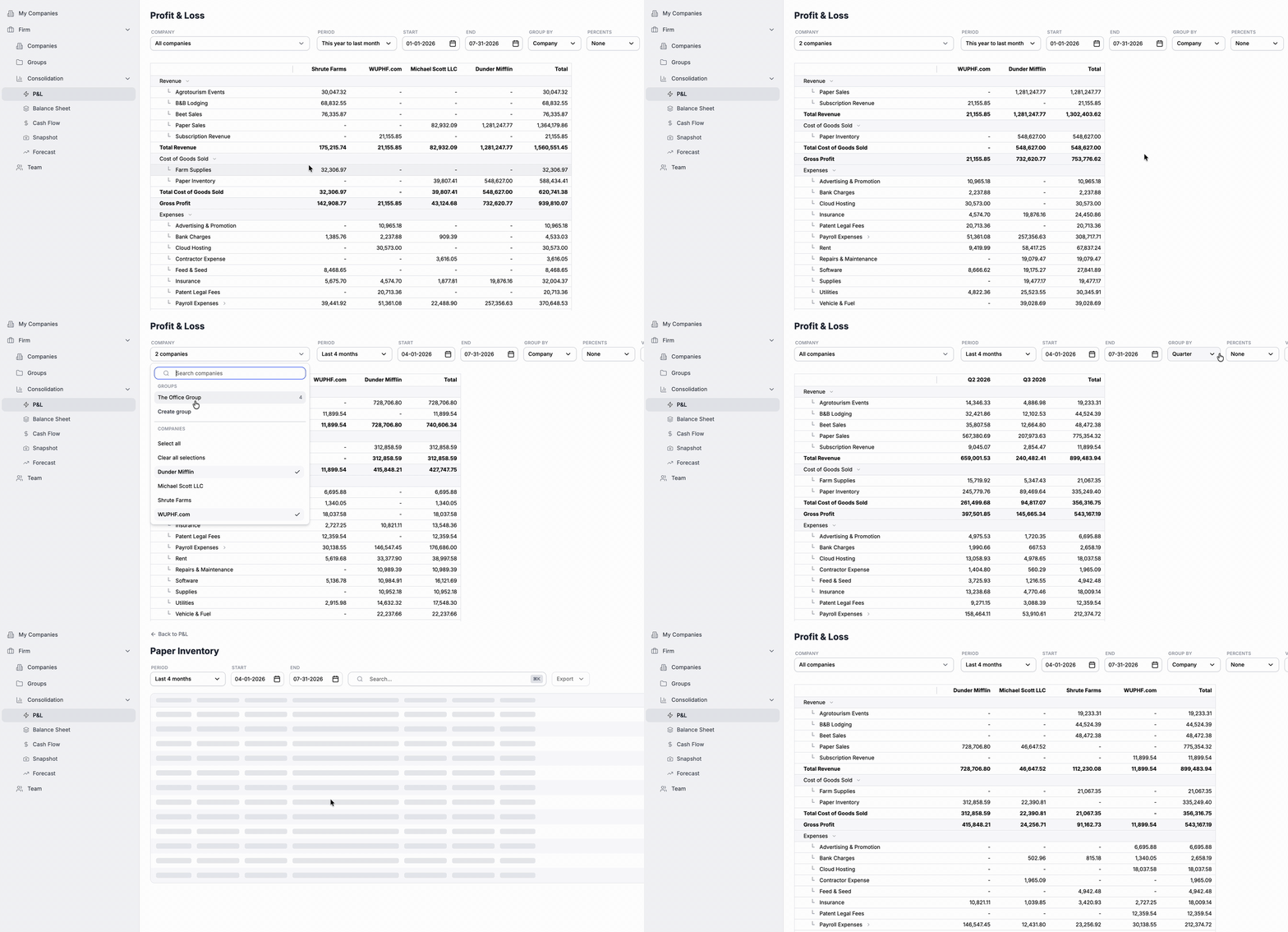
3. Every number opens, and every fix happens right there. Click any consolidated figure and you're looking at the actual transactions behind it, across all entities. Reporting tools can show you a synced line item too; what they can't do is let you fix it where you found it, because the books live back in separate QuickBooks files. In one ledger, you spot a miscoded expense, correct it on the spot, and the consolidated report is simply right again, because there was never a copy to go stale.
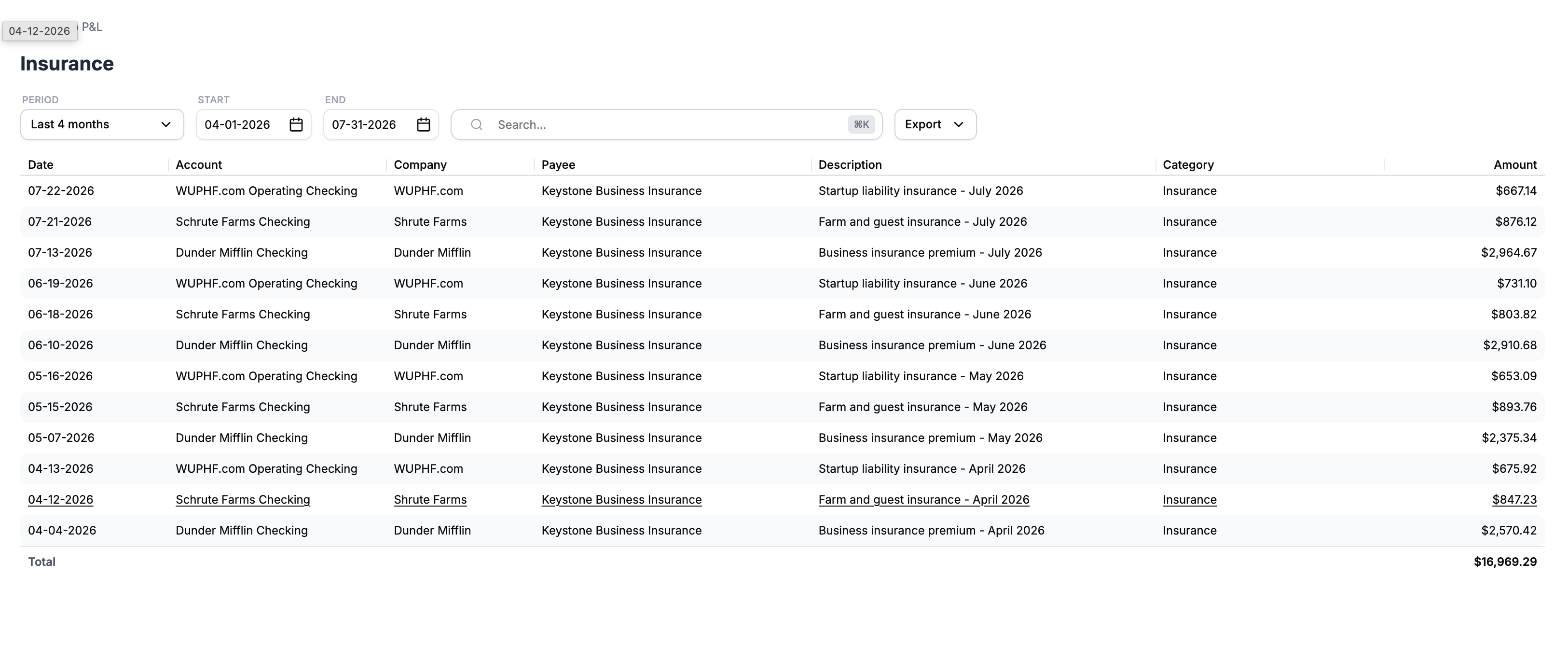
That's the entire idea. Once all the entities live in one ledger, consolidation stops being a feature you buy and becomes a question you ask.
"But I'd have to leave QuickBooks"
Yes, and we'd rather address that than dance around it. Migration is real work, and anyone who tells you otherwise is selling something a little too hard. Here's what we've learned from the businesses and firms who've made the move:
- You don't migrate everything at once. Most firms start with one multi-entity client, usually the one whose consolidation spreadsheet they resent most. Most owners start with their newest or simplest entity.
- History comes with you. Prior transactions import so year-over-year reporting survives the move.
- The payback is monthly. Whatever the switch costs in effort, the spreadsheet ritual was costing you every month, forever. That math tends to settle the question on its own.
And because pricing is the other half of the QuickBooks pain: you shouldn't need a separate full-price subscription per entity just to see your own companies side by side. That per-entity toll is the tax QuickBooks charges for your structure being sensible.
Who this is for
Honestly, not everyone. If you run one company, QuickBooks and half a dozen other tools will serve you fine, and we'd tell you so. Multi-entity is for:
- Owners of several operating companies who want one answer to "how are we doing?"
- Real estate investors with an LLC per property and a P&L that currently lives in Excel.
- Franchisees running the same business in four locations and consolidating by hand.
- Bookkeeping and accounting firms with multi-entity clients, for whom every one of these people is a Tuesday.
If that's you, we'd be happy to show you the one-click version with your own entities in mind.
FAQ
Can QuickBooks Online handle multiple companies under one subscription? No. Each company requires its own subscription and its own login. QuickBooks offers no native consolidated reporting across companies on standard plans.
What is multi-entity accounting software? Software where multiple companies live in one system under one login, with consolidated financial statements built in, rather than one file per company stitched together by spreadsheets or sync tools.
How is this different from LiveFlow, Fathom, Qvinci, or Reach? Those tools sync copies of your QuickBooks data into dashboards or spreadsheets and consolidate the copies. The better ones automate account mapping and eliminations within their layer. But the books remain in separate QuickBooks files: every subscription stays, and every correction happens back inside the right QBO file, then syncs. In a native multi-entity system there is no sync and no copy: the consolidated view is the ledger itself, and you fix a number in the same place you found it.
Isn't an ERP the same idea? Same principle (one system, many entities), very different scale. ERPs are built for companies with finance departments, implementation timelines, and budgets to match. Switchbooks was built inside a bookkeeping firm for the businesses and firms that live between QuickBooks and an ERP: several entities, monthly consolidation, no appetite for an enterprise project.
Do I have to move all my entities at once? No. Most people migrate one entity or one client first, verify the books, and move the rest on their own schedule.
What does Switchbooks cost for multiple entities? See current pricing on our pricing page. The short version: it's built so that adding entities doesn't mean multiplying full subscriptions the way QBO does.