Switchbooks vs QuickBooks Online: An Honest Comparison From Someone Who Used Both
October 6, 2026By Ryland BeardQuickBookscomparisonconsolidation
I used QuickBooks Online every working day for about eight years while growing a bookkeeping firm to forty people. I also built Switchbooks. So read this knowing where I stand, and knowing that I'm going to tell you where QuickBooks is still the better choice, because if I don't, you won't believe anything else here.
The short version: QuickBooks Online is a toolbox. A very good one. Switchbooks is closer to a bookkeeper who happens to live in your software. If your problem is that you need more tools, stay with QuickBooks. If your problem is that the tools are there and the books are still three months behind, keep reading.
The one-paragraph answer
Stay on QuickBooks Online if you track inventory, or if your accountant refuses to work in anything else. Those are real reasons and I respect both. Move to Switchbooks if you run a service business, if you own more than one company, if you are tired of sorting transactions yourself, or if you have looked at your QuickBooks bill lately and wondered how it got there. Everything below is the long version of that paragraph.
Side by side
| QuickBooks Online | Switchbooks | |
|---|---|---|
| Price | $38 to $340 per month per company | $25 per month per company |
| Promo | 50% off for 3 months, then full price | None. The price is the price |
| Price history | Raised every year since 2023 | One price since launch |
| Categorizing transactions | You sort rows, or build rules | Tell Elliott, or let him do it |
| Reports | You build and run them | Ask for them |
| Multiple companies | Separate books, third-party tool to consolidate | Built in, with groups you define |
| Migration | From anywhere, with work | From QuickBooks Online, pick a date |
| Payroll | Built in. I tell clients to use Gusto instead | Gusto |
| Invoicing | Built in. See below | Not included |
| Inventory | Yes | No |
| Integrations | Thousands. See below | Bank feeds first, on purpose |
| AI | Added on top of a 25-year-old system | The product was built around it |
| Logging in | Close the pop-ups, then find your work | Opens to a chat |
| Works inside Claude, Cursor, Grok | No | Yes, through MCP |
| Accountant access | Yes | Yes, every client from one login |
Consolidation is where QuickBooks falls apart
If you own one company, skip this section. If you own two or more, this is the section.
QuickBooks Online has no idea your companies are related. Each one is its own subscription with its own login and its own books. When you want to know how everything did last month, QuickBooks has no answer, because it was never built for someone who owns more than one thing.
The industry's workaround is a second product. Qvinci, Fathom, LiveFlow, Jirav. They sync copies of each QuickBooks file into their own system, you map the charts of accounts to each other, and they build a consolidated report out of the copies. I have set these up for clients. They work, mostly. They are also another monthly bill, another login, another thing to learn, and another place where numbers can drift from the books. When something is wrong in the consolidated report, you go back into the right QuickBooks file, fix it there, and wait for the sync.
We built Switchbooks around this problem because it was the problem my firm had every single month. All of your companies live in one place. You pick which ones to look at and the consolidated P&L is just there. If you have ten companies you can group them however you think about the business: East Coast against West Coast, Texas against Arizona, operating companies against holding companies. If you have two or three, you can roll them into one combined P&L for your tax preparer and be done. No mapping project. No second subscription. No sync.
For anyone with more than one entity, this alone usually decides it. There is a longer piece on how to build a consolidated P&L if you want the detail.
Three things QuickBooks has that I told clients not to use
This is going to sound like I am piling on, so let me say up front: I gave this exact advice to QuickBooks clients for years, long before Switchbooks existed. It has nothing to do with selling you something. It has to do with cleaning up the mess afterward, which was my job.
Payroll. QuickBooks has payroll. I recommend Gusto, to everyone, including clients who stay on QuickBooks. The journal entries QuickBooks payroll creates frequently do not match what actually ran. Wages land in the wrong account, liabilities do not clear, and the person who finds out is whoever reconciles the books three months later. Gusto's entries tie out. That is the whole reason.
Invoicing. QuickBooks invoicing works on a chain: invoice, payment, deposit. Every link has to be matched to the next one. When a customer pays two invoices with one check, or the processor batches three payments into one deposit, or someone records the payment and then also categorizes the deposit, the chain breaks. Revenue is doubled or missing, accounts receivable shows money that already arrived, and the bank does not reconcile. I see this on a daily basis at Ledge. It is the single most common way a small business ends up with books it cannot trust.
Integrations. People tell me they are staying on QuickBooks because of the integrations. Here is what eight years of looking at integrated books taught me: almost all of them produce financials that are about 98% right. That sounds good. It is not. The 2% does not stay 2%. It compounds every month until someone has to unwind a year of small mistakes, and that someone is expensive. The integrations are usually built by people who understand their own product and not how the accounting should land. My rule for clients was to avoid integrations unless the integration was genuinely excellent, and Gusto is the example I always gave. Build the books from the bank. The bank is what actually happened. Everything else is somebody's version of what happened.
Switchbooks does not have payroll, invoicing or an app store. That is not a gap we forgot to fill. It is how you get books that are right.
What it is like to log in
This one is small and it is the thing I hear about most.
Open QuickBooks Online on an ordinary morning, as an existing user, not a new one, and count the pop-ups you close before you can see your own homepage. I have counted. The average is four. A promotion for a product you already declined, a tour of a feature you did not ask about, a survey, a reminder to upgrade. Then the dashboard, which is mostly tiles trying to sell you something else. Then you start looking for the thing you actually logged in to do.
Multiply that by every client, every day, for eight years, and it stops being a small thing. It is the texture of working in QuickBooks, and it is why so many bookkeepers I know open it with a sigh.
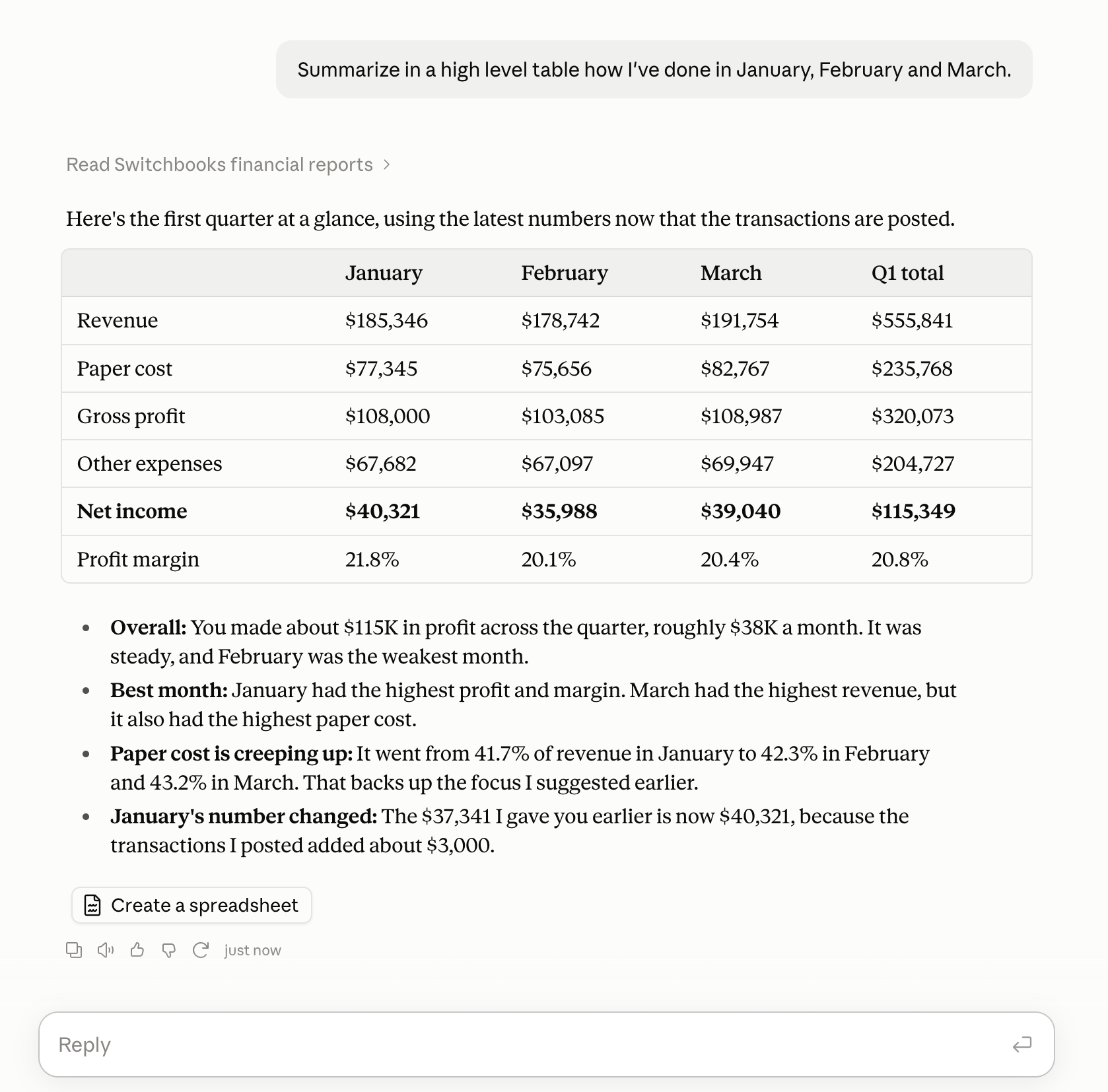
Switchbooks opens to a chat. You type what you want. There is nothing to dismiss, because there is nothing we are trying to sell you once you are already paying us. Ask how the quarter went and this is the whole interaction:
The AI question
QuickBooks has been adding AI features, and I will say the obvious thing once and move on. The system underneath is twenty-five years old and has had features bolted onto it for all of those years. The AI sits on top of that pile. It suggests categories, sometimes well, and it cannot do much else, because the product under it was built for a person clicking through screens.
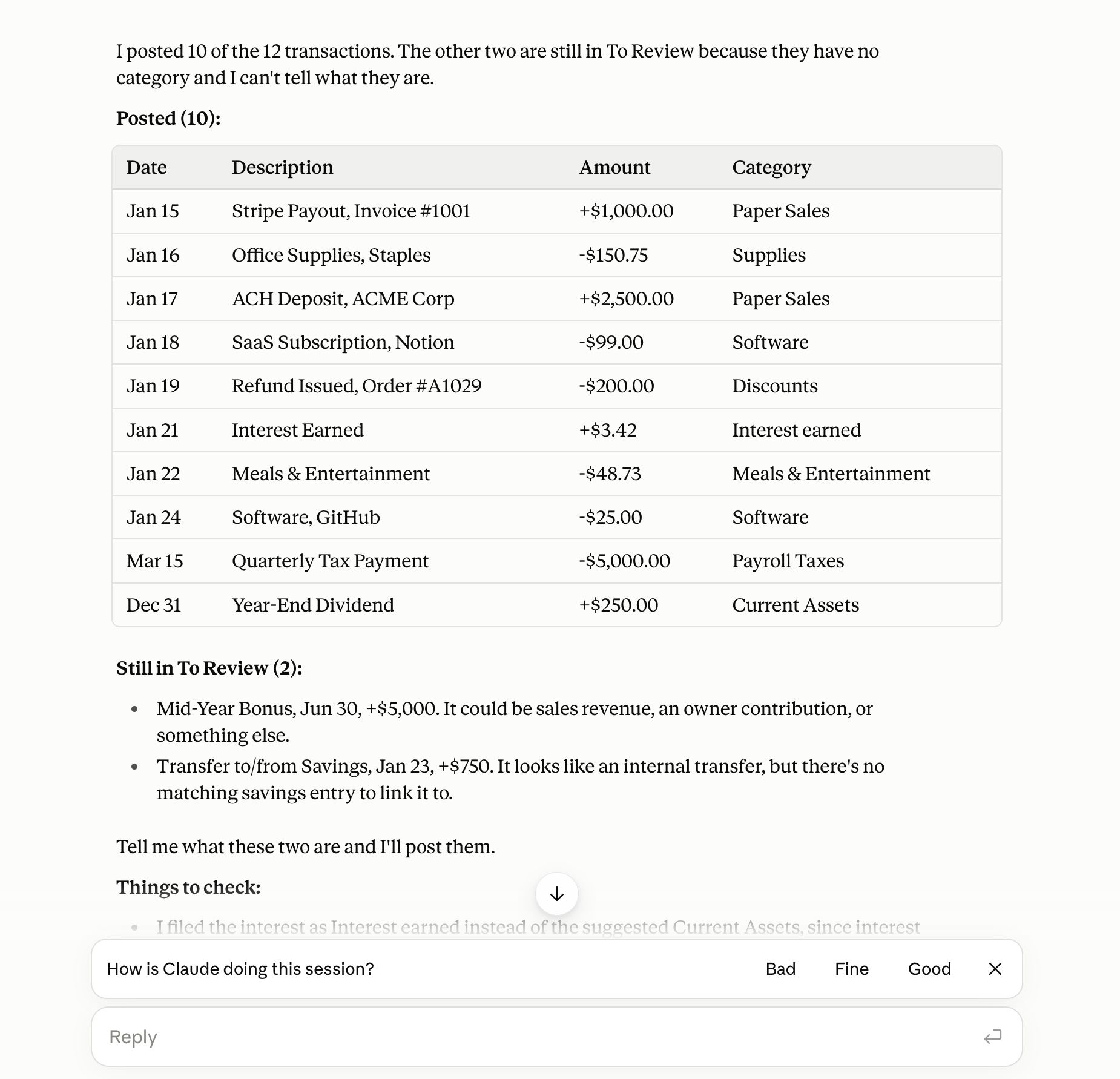
Switchbooks started from the other direction. The agent, Elliott, is the product. Tell him to do your accounting and he categorizes, posts, matches transfers, reconciles, books journal entries and runs the reports. What he changes is recorded and can be undone. You can also connect Switchbooks to Claude, Cursor or Grok and work on your books from there, which QuickBooks does not do. Here is what that looks like in Claude, told to post everything and report back:
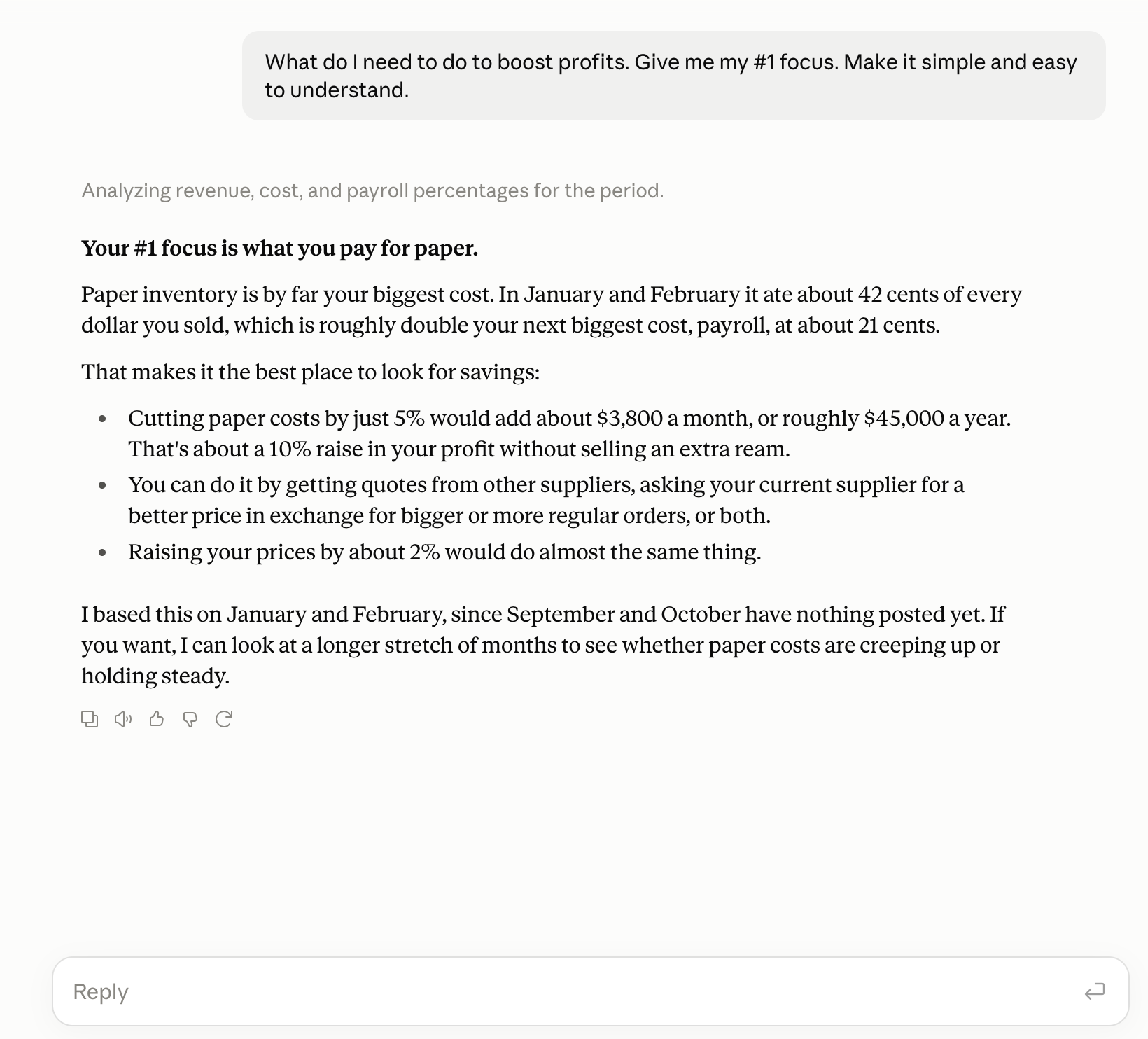
And here is the part QuickBooks cannot do at all, because its AI has no ledger to reason over. Ask what to focus on and you get an answer with your numbers in it:
If you want more detail, read about working with Elliott or the Claude walkthrough.
What it actually costs
Go to the QuickBooks pricing page and you will see $19 a month. Read the small print and it says 50% off for three months. The real price for that plan is $38, and that is the lowest tier. Essentials is $85. Plus, the one most small businesses end up on, is $140. Advanced is $340. Those are the prices as of October 2026, and they are the prices after the increase in August 2026, when Plus went from $99 to $140 and Advanced went from $200 to $340.
That was not a one-time correction. QuickBooks has raised prices every year since 2023. If you have been on it for a while, look at your first invoice and your most recent one.
Then add what the subscription does not include. Multiple companies means multiple subscriptions. Consolidation means a third-party tool. And the biggest line is usually not software at all. It is the bookkeeper you pay to sort transactions, chase the invoice chain, and clean up the integrations.
Switchbooks is $25 a month per company, with everything included. Across the clients we have moved so far, the average saving is $409 a month between software and bookkeeping fees. The software difference is real, but most of that number comes from no longer paying a person to do work that Elliott does.
That is the actual reason most people switch. They are not switching because they love new software. They are switching because they have realized that doing it the old way has a price, and it has been going up.
How switching works
This is the part people worry about most, and it is the easiest part.
Pick a date. Say December 1. In Switchbooks, import your QuickBooks Online data through November 30: chart of accounts, balances, history. Then connect your bank and credit card accounts, and Switchbooks pulls everything from December 1 forward. Tell Elliott to go through it and reconcile. He will. You check his work the first month, and then you mostly stop checking.
Nothing is deleted from QuickBooks. Your old file is still there, read-only if you like, and plenty of people run both for a month before they cancel. The import is for QuickBooks Online only. Almost everyone comes from there, so that is what we built. The step-by-step is in the migration guide.
Who should stay on QuickBooks
I meant what I said at the top.
If you carry inventory and need to track it at the item level, stay. We do not do that.
If your accountant will only work in QuickBooks and you are not willing to change accountants, stay. The relationship matters more than the software. Though you might ask them to look at what Switchbooks offers firms, because a lot of accountants are quietly tired of QuickBooks too.
If you are a one-person business with a handful of transactions a month and QuickBooks Simple Start is working for you, you are probably fine where you are, as long as you know what it will cost after month three.
Everyone else: the books are not going to catch themselves up. Try it free and let Elliott take a pass at them.