There are two ways to use ChatGPT for bookkeeping. Paste a bank statement into the chat and it sorts the obvious rows while you check the rest in a spreadsheet. Connect it to your books through the Switchbooks plugin and it works in a real ledger: it posts, matches transfers, reconciles from a preview, and records every change so most can be undone from the chat. Both routes are below, with the prompts.
I ran a bookkeeping firm for about eight years before building Switchbooks, and I have seen a lot of books that started life as a ChatGPT paste. Here is how to do that with the least damage, then how to connect.
Two ways to use ChatGPT for bookkeeping
The first is the plain chat window: export a statement, paste it in, and ChatGPT suggests a category for each row. Nothing is saved except the chat. The second is ChatGPT connected to a ledger: install a bookkeeping plugin from the plugin directory, sign in, and ChatGPT can read and change real books, every account, category and rule included.
One thing that is neither: the Finances tab in ChatGPT. It is a personal spending view, not business books.
The why is in Can ChatGPT do my bookkeeping?. This post is the how.
| Task | Pasted statement | Connected to Switchbooks |
|---|---|---|
| Data source | A CSV you export and paste, one account at a time | The bank feed through Plaid, every account |
| Transfers | Sees one side, often calls it income or expense | Sees both sides and matches them |
| Memory | None, you brief it again next month | Kept in the books |
| Reconciling | Cannot | From a preview, finished when you say yes |
| Undo | None, you edit the sheet | Every change recorded, most undone from the chat |
| Setup | An export and a scrub every month | About three minutes to install, one bank connection in the app |
Route 1: a pasted statement, step by step
Six steps, in this order, because the first one is the one people skip.
1. Check your data controls. Find out in ChatGPT's settings whether your plan uses your conversations to train models, and turn that off if you can. If you cannot, decide whether you want a copy of your statement living in a chat log.
2. Export one account for one month. On your bank's site, open the account, find Download or Export, set the date range to the month, and choose CSV. A bigger paste means more guessing.
3. Scrub the file. Delete the account number column, the running balance, and any column with a person's name or a card number. Keep date, description and amount, or debit and credit. Then read down the descriptions for anything on this list.
Never paste:
- Account or routing numbers
- Card numbers, even partial ones
- Your SSN or EIN
- Logins or passwords
- Customer details you do not need for the category
4. Paste your category list first. The categories you actually use, one per line, before any transactions. Without it, ChatGPT invents a new chart of accounts every month, and your months will not compare.
5. Paste the rows with a rules block. The rules turn a chat into something you can check. This starter prompt differs from the one in the can-it post, which assumes several accounts at once.
Here is one month of transactions from one bank account, and the list of categories my business uses.

Rules:
1. Give each row one category from my list. Do not create new categories.
2. If you are less than 80 percent sure, write "review" instead.
3. If a row looks like money moving between my own accounts, write "transfer, review". Do not call it income or an expense.
4. Do not invent vendor names. If a description is unclear, say so in the Note column.
5. Do not change any date or amount.
6. Return one table: Date, Description, Amount, Category, Note.
7. After the table, list each review row with the one question you would ask me.

My categories:
[paste your list, one per line]

My transactions:
[paste the rows]
6. Copy the result into a sheet. Columns Date, Description, Amount, Category and Note. Fill in every review row yourself. That sheet is your record. The chat is not.
Five ChatGPT bookkeeping prompts for a pasted statement
Most prompt lists online are untested. These five are built around the ways pasted books go wrong, so each comes with what to watch for. The can-it post runs ten real rows both ways, so I will not reprint them here.
Prompt 1: sort the rows.
Using my categories and the rules above, categorize every row. Mark anything you are unsure about as review.
Watch for confident guesses on coded descriptions. A payment processor charge could be lunch, a contractor or inventory, and with no history to look at, ChatGPT picks one and sounds sure. If no rows come back marked review, be suspicious.
Prompt 2: find the transfers.
Which rows look like money moving between my own accounts, such as a card payment, a transfer to savings or a loan payment? List them separately, not as income or expenses.
Watch for the one-sided view. With one statement it sees only one side, so it can only guess from the description and the amount. Check each row against the other account yourself. A missed transfer is the most common error in pasted books, and it counts a cost twice.
Prompt 3: flag what looks personal.
Which rows might be personal rather than business? List them with a one-line reason and do not categorize them yet.
Watch for vendor-name logic. It does not know your business, so a grocery store looks personal even if you run a catering company. Treat the list as questions, not answers.
Prompt 4: month-end checks.
Check this table for likely duplicates, round-number payments that might be transfers or owner draws, and vendors that appear only once. List each with its row.
Watch for the edge of the paste. It cannot tell you a vendor that appears once this month appeared every month last year, because it has never seen last year. If you want that comparison, you paste last year too, every month.
Prompt 5: summarize the month.
Total the categorized rows by category, income and expenses separately, and show the net for this one account. Leave out anything marked review or transfer.
Watch for the word "net". This is a rough summary of one account, not the profit and loss, which needs every account. If a transfer slipped through Prompt 2 as an expense, the net is wrong and nothing in the chat will say so. A balance sheet is out of reach for the same reason.
That is where the paste route stops. One account at a time, so transfers look like income or expense. No memory next month, so you brief it again. Nothing reconciles, because it only has the bank side. And a chat is not a ledger. If any of that is your problem, the rest of this post is the fix.
Route 2: connect ChatGPT to your books
Three steps, about three minutes.
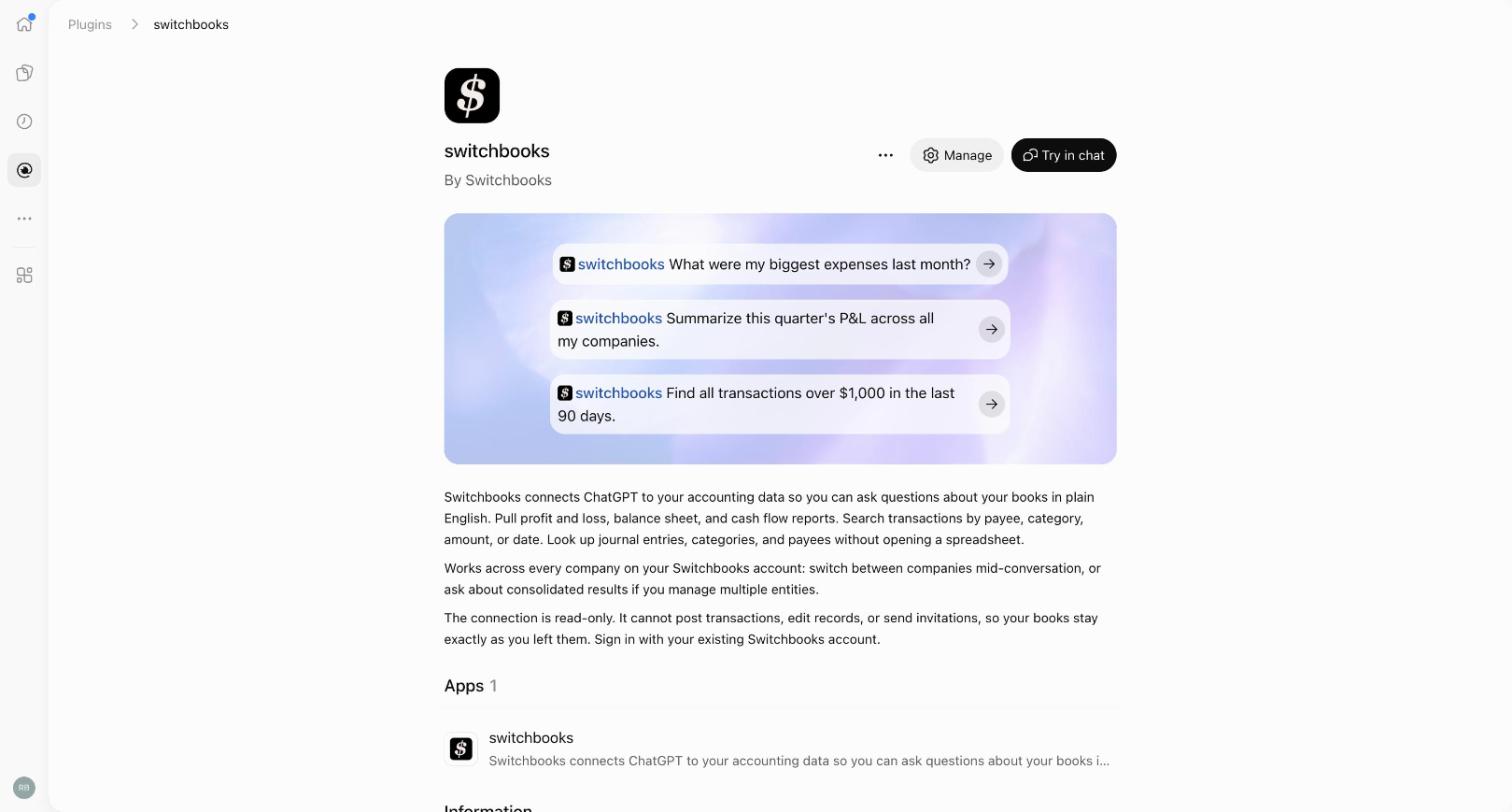
1. Install the plugin. Open Switchbooks in the ChatGPT plugin directory and click Install plugin, or open Plugins in the ChatGPT sidebar and search for Switchbooks. What you can see can depend on your plan, and a workspace admin may need to make it available first.
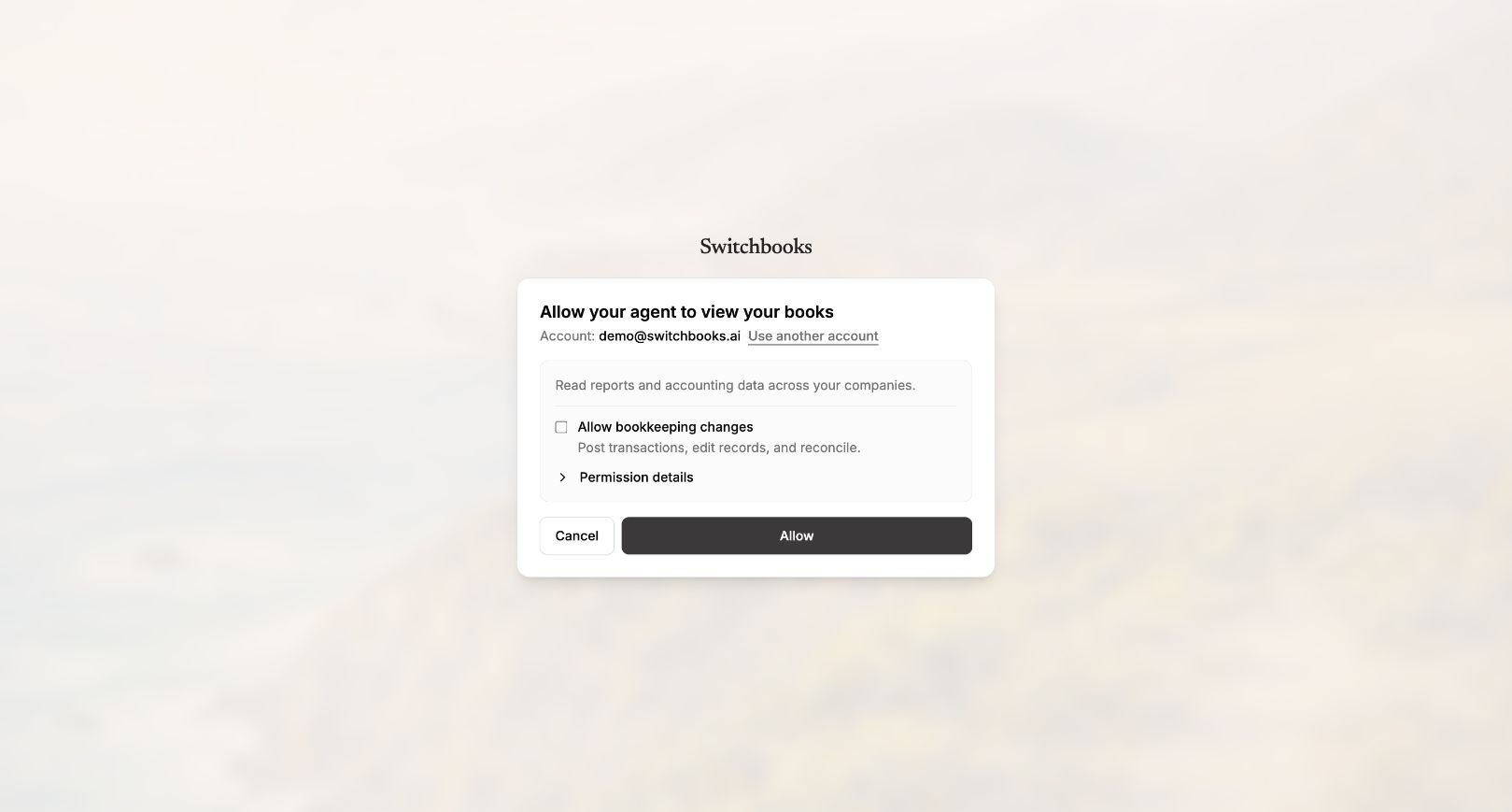
2. Sign in and set the permission. Sign in to Switchbooks, or create an account right there, and read what the connection may do. Tick Allow bookkeeping changes if ChatGPT may post, edit and reconcile, or leave it unticked for read and report only. Click Allow. The connection uses OAuth, so ChatGPT never sees your Switchbooks password or your bank login. To change the setting later, remove the plugin under Settings, then Plugins, and install it again. If the listing text still describes the first, read-only version, go by the permission screen.
3. Start a chat. Type @switchbooks, ask for your companies, and name the one to use. The eight prompts below pick up from here.
New to Switchbooks? One more step happens in the app, not in ChatGPT: connect your bank. Feeds run through Plaid, you do it once, and that is where the transactions come from. Connecting a bank, importing files and the owner request link your accountant sends all stay in the app.
Whichever box you ticked, no connected assistant can sign in to your bank, move money, invite or remove people, share a report, change billing or delete the company. The full lists are in the plugin post and on the AI assistants page.
Eight prompts once ChatGPT is connected
Eight asks, in order, on a company with a month in To Review and changes allowed. What comes back depends on your books, so it is described in general terms.
1. Find the company.
List my Switchbooks companies.
Then "Use [company name]". It lists every company your login can see, every client if you are a bookkeeper. Every later result is tagged with its company, so two cannot mix in one chat.
2. See what is waiting.
What is in To Review?
The rows in from the bank and not yet posted, with date, description, amount and account.
3. Brief it like a new bookkeeper.
Here is how we keep these books: [what the business sells, what the regular vendors are for, what counts as equipment rather than supplies].
Say it the way you would on someone's first day. The briefing is kept in the books, not the chat, so it is still there next month, and from Claude.
4. Post what it is sure about.
Post everything you are sure about, and list the rows you want to ask me about.
It posts what it can place from your categories, rules and briefing, then returns the list and its questions. Answer in plain words and it posts those too. This works with no rules at all.
5. Match the transfers.
Match the transfers between my accounts.
It finds both sides of each transfer across accounts, the card payment leaving checking and arriving at the card, and matches them so neither side lands in income or expense.
6. Reconcile to the statement.
Reconcile [account] to the statement ending [date] with a balance of [statement balance].
Take the balance from your bank statement, not from the app. It shows a preview first, with any difference and the rows that do not match. Say yes and it finishes. A finished reconciliation can be undone.
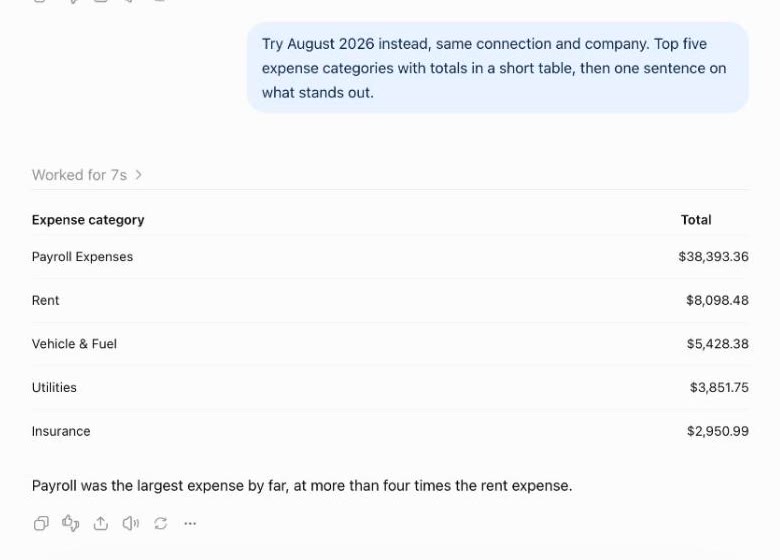
At any point, ask for a report: last month's profit and loss, the balance sheet, the biggest expenses. Here is a read-only connection answering an expenses question on a demo company:
7. Check the work.
What did you change today?
A plain-words list of each change, in order.
8. Undo one.
Undo the last one.
It reverses that change through the same path a person would use. Most changes come back this way; hard-to-reverse steps, like merging two categories, wait for your yes before they happen.
The same eight asks work in Claude, Cursor and Grok Bot, and inside Switchbooks with Elliott, because they all run the same tools on the same books.
Paste or connect: which one for you
Paste a statement if you have one bank account, nobody else reads the numbers, a spreadsheet is a fine record, and you will do the export, the scrub and the review rows every month. For that business the paste route is a faster spreadsheet, and it beats a shoebox.
Connect if any of these are true. You have a credit card and a checking account, so transfers exist. You want next month to start where this month ended. An accountant, a lender or a partner needs to trust the numbers. You run more than one company. Or you have done the paste routine twice and do not want a third.
Cost: the plugin is free. Switchbooks is $25 a month per company, every feature included, 10-day free trial, no card. The same login works in Claude, Cursor and Grok Bot, and over MCP, so the books are not tied to one chat.
One honest limit: Switchbooks has no payroll, invoicing, CRM or inventory, so you keep your tools for those. And one note if you are on QuickBooks Online: moving is a date rather than a project. Import QuickBooks through that date, connect the banks forward, and Elliott reconciles, with QuickBooks left intact. Steps are on the migration page.
Questions people ask
Which ChatGPT setting should I check before pasting?
Whether your plan uses your conversations to train models. Find that in ChatGPT's settings and turn it off if you can, then paste one account for one month with account numbers, card numbers and names removed. Connected, the books stay in Switchbooks and ChatGPT reads what you ask for through OAuth, without seeing your Switchbooks password or your bank login.
Can ChatGPT categorize bank transactions?
Yes, two ways. Pasted, it suggests a category per row and you copy the result into a spreadsheet and check the review rows. Connected to Switchbooks with changes allowed, it posts the rows it is sure about, asks about the rest, and remembers your answers next month.
Can ChatGPT reconcile from a pasted statement?
No. Reconciling means comparing the books to the bank, and a paste gives it only the bank. Connected, it reconciles an account to the statement balance you give it, shows a preview with any difference, finishes when you say yes, and the finished reconciliation can be undone.
Do I need a paid ChatGPT plan for the plugin?
The plugin is free, and Switchbooks is $25 a month per company after a 10-day free trial with no card. Which plugins you can see can depend on your ChatGPT plan, and a workspace admin may need to make it available, so check the listing from your own account.
Is a ChatGPT conversation my bookkeeping record?
No. A chat is not a ledger. On the paste route, the spreadsheet you copy the result into is your record, so keep it. Connected, the ledger in Switchbooks holds every transaction, every category and every change, with the undo trail beside it.
Can I use ChatGPT Finances for my business books?
No. It is a personal spending view, not business books. Business books need a ledger with every account, matched transfers and reconciliations, and ChatGPT gets one by connecting to Switchbooks through the plugin.
To try the connected route, start a free trial, connect a bank in the app, then install the plugin in ChatGPT and ask what is in To Review. The connect tutorial covers every assistant on one page.
Related reading
Switchbooks is a bookkeeping plugin for ChatGPT. Install it and ChatGPT can run your P&L, post transactions, match transfers and reconcile, with undo.
Can ChatGPT do your bookkeeping? With a pasted statement, only partly. Connected to real books through the Switchbooks plugin, yes. Here is both.
Which AI agents, plugins and connectors actually do the books in ChatGPT, Claude, Grok Bot and Cursor, and a six-question test to run before you trust one with a month.