AI can do most of your bookkeeping now. Connect your bank and cards, let it sort everything, and answer its questions in plain English. Switchbooks is $25 a month per company and works inside ChatGPT, Claude, Cursor and Grok Bot.
The catch is that the AI needs real books to work in. Pasting a bank statement into a chat isn't enough.
I ran a bookkeeping firm for eight years and grew it to forty people before I built Switchbooks. Here is what AI can really do in your books today, how to automate your bookkeeping with AI step by step, and what you should still keep for a person.
What can AI actually do in your books?
More than most people expect. A good AI bookkeeping agent can:
- Categorize and post transactions from your bank and card feeds
- Match transfers, like a card payment leaving checking and landing on the card
- Reconcile each account, which means proving the books match the bank statement
- Book journal entries, like month-end adjustments
- Run your profit and loss, balance sheet and cash flow, and answer questions about them
What it can't do is know your business without being told. It doesn't know that the Friday Zelle is your subcontractor or that Amazon over $200 is equipment. It also shouldn't be making tax calls. The best setups treat the AI like a fast new bookkeeper: it does the sorting and matching, and it asks you when something isn't clear.
Can ChatGPT, Claude or Grok Bot do my books?
Yes, once it's connected to real books.
If you paste a bank statement into ChatGPT, it can sort the rows for you. That's helpful, but it isn't bookkeeping. Nothing gets posted anywhere. It can't see your card account to match the payment, it can't prove the books match the bank, and next month it starts from zero.
Connect it to bookkeeping software and that changes. Switchbooks is listed in the ChatGPT, Claude, Cursor and Grok Bot directories and in the official MCP registry. MCP is the standard way AI assistants connect to outside software. Once you connect it, the assistant you already use can post transactions, add rules, reconcile and run reports in your actual books. QuickBooks and Xero have ChatGPT connections now too, but those center on invoices, lookups and reports. The difference with Switchbooks is that the assistant does the bookkeeping itself.
If you want the longer answer, I wrote Can ChatGPT Do My Bookkeeping? and Can Claude Do My Bookkeeping?. For the ChatGPT setup itself, see How to Use ChatGPT for Bookkeeping. The full list of supported assistants is on the AI assistants page.
How to set it up, step by step
1. Pick software with a built-in agent
The AI needs somewhere real to work. Pick bookkeeping software that has an agent built in, or one that connects to the assistant you already use. In Switchbooks you get both. The agent inside the app is called Switch, and the same tools work from ChatGPT, Claude, Cursor or Grok Bot.
If you're coming from QuickBooks, Switchbooks can bring your books over, so you don't start from a blank page.
2. Connect your bank, and every card
Connect checking, savings, every credit card and any loan. This is the mistake I see most. People connect checking only. Then the AI sees $3,200 leave for the card payment, and with no card account on the books, it looks like an expense. Connect the card too and it sees both sides, matches them as a transfer, and nothing gets counted twice.
3. Tell it about the business
Write the AI a few sentences, the same way you'd brief a new bookkeeper. What you sell, how you get paid, your main costs, and anything that isn't obvious. Here's a made-up example for a landscaping company: "My biggest costs are two crews on payroll, fuel and materials. The monthly Zelle to our tree subcontractor is Contractors. Transfers to my personal account are owner's draws." A message like that settles a lot of the questions it would otherwise ask.
4. Let it take the first pass
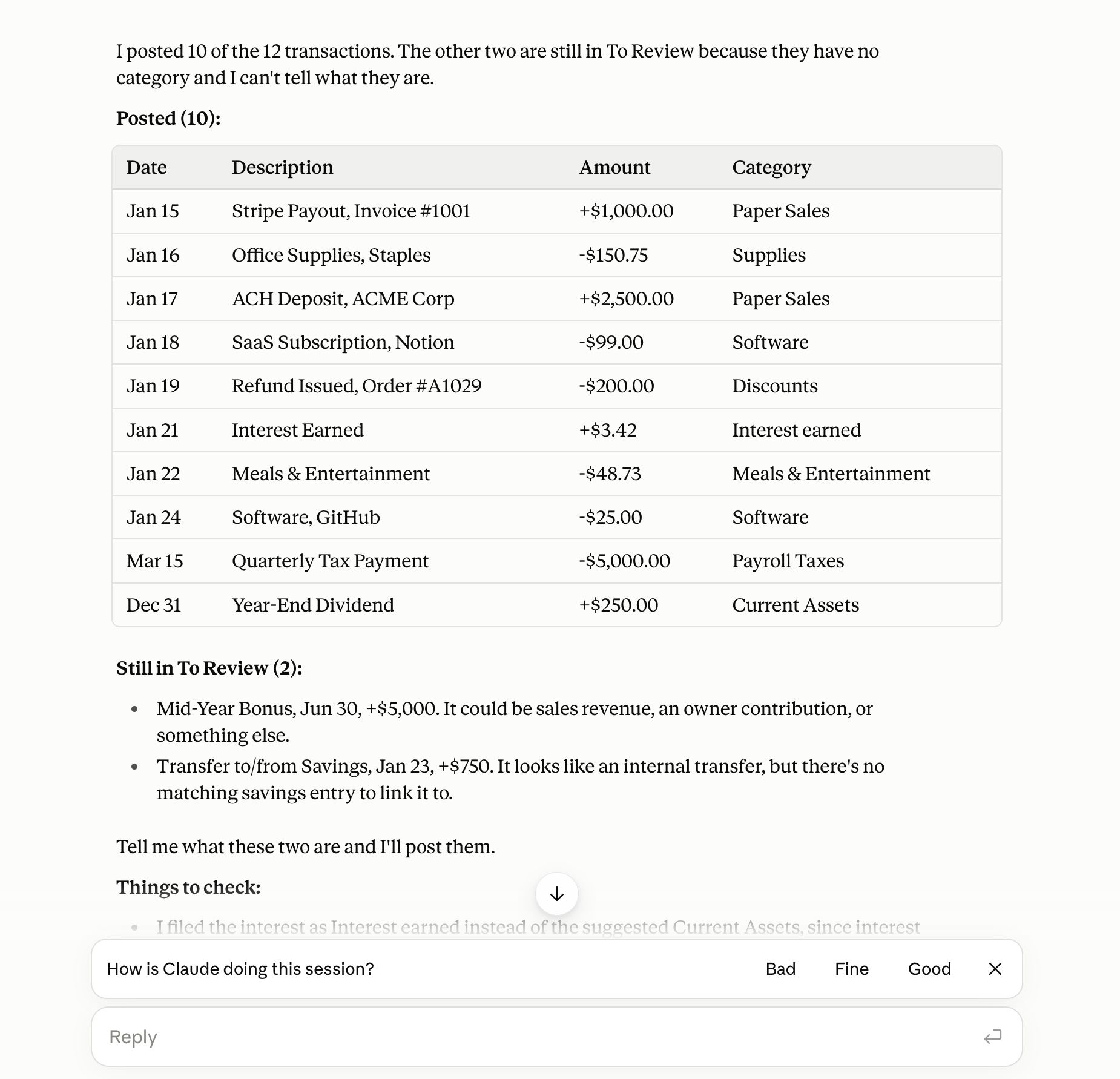
Ask it to post everything it's sure about and list the rest with its best guess. The ordinary transactions post right away, because fuel is fuel and payroll is payroll. What's left is the short list a good bookkeeper would have asked you about anyway: the new vendor, the odd amount, the check with no payee.
5. Answer its questions in plain words
You don't need accounting terms. "That's a part time contractor." "Personal is fine." "That's software." It posts each one as you answer.
6. Turn the answers you repeat into rules
This is the step people skip, and it's why their second month takes as long as their first. When you answer the same question twice, make it a rule. From then on, every matching transaction files itself. In my experience, a few rules after the first month take care of most of the repeat questions.
7. Reconcile every month
Reconciling is how you prove the books match the bank. When the statement comes in, give the AI the ending balance and let it compare. If it's off, it shows you the rows in between, which is usually where a missing fee or a duplicate is hiding.
8. Read the month-end reports
Ask for the P&L and balance sheet. Ask questions about them. "Why did supplies double?" "Show me the rows behind that." Because the books are reconciled, these are numbers you can hand your banker or your accountant.
For a longer walkthrough of each step with example prompts, see How to Have AI Do Your Bookkeeping: The 15-Minute Setup, or the companion guide on my own site.
What a real month looks like
Here's what this looked like recently for a clothing brand we work with.
Clearing the pile by chat. The owner cleared about 30 unclear transactions in roughly an hour, just by replying to questions with things like "part time contractor" and "Personal is fine." Each one posted as soon as it was answered. For payees that come up again and again, a rule was added so their future payments file themselves.
Catching a double count. One entry was counting about $85,000 of stock a second time. It matched January's supplier payments to the cent. One question to the owner sorted out what it was meant to be, and it was fixed the same day.
Redoing month-end in one pass. The brand books a monthly entry that sets product cost at 25% of sales. When the owner said buy-now-pay-later sales count as sales too, all nine months were updated in one go. Each entry's memo shows the sales number it was based on, and the whole change can be undone.
Tracing a payment across two companies. Two $20,048.34 supplier payments a day apart looked like the supplier got paid twice. Reading both companies' bank activity showed one was paid directly and one through a related company, and the amounts between the two companies matched to the penny. The owner confirmed they were two separate orders, so nothing needed to change.
None of that took accounting knowledge from the owner. It took a few short answers.
What still needs a person
Automating the bookkeeping doesn't mean automating every decision about your money. Keep these for a person:
- Taxes and entity questions. Whether a trip is deductible, whether to set up a second company, how to take a distribution. That's advice, and it should come from someone who signs their name to it.
- Judgment calls. A good AI asks when it isn't sure. Keep answering. Your answers are what make the books yours.
- A human bookkeeper, if you want one. Switchbooks is software, not a service. If you want a person doing the books for you, a service like Pilot or Zeni, or a firm, is the better fit.
- Anything it flags as unclear. If a transaction doesn't fit, it shouldn't guess. Look at the short list it hands you.
In my experience, owners do best pairing the AI with an accountant for a quarterly look and the tax return. Switchbooks has accountant access, so your accountant can log in and review the same books.
What it costs
Prices are US list prices as of October 2026.
| Tool | Price | What you get |
|---|---|---|
| Switchbooks | $25/month per company | Every feature, the agent, and the ChatGPT, Claude, Cursor and Grok Bot connections. 10-day free trial, no card. |
| QuickBooks Online | $38, $85, $140 or $340/month | Payroll, invoicing and inventory. AI features grow with the plan. |
| Xero | $27, $59 or $97/month after the intro discount | Automatic reconciliation starts at Growing ($59), or $5 extra on Early. |
| Digits | $65 or $100/month per company | AI ledger with bill pay and invoicing. |
| Puzzle | From $30/month for one seat, $72 for five | AI ledger built for startups. |
| Booke AI | $129/month per company | On top of your QuickBooks or Xero bill. |
| Pilot | From $99/month for AI-only | Plans with a person are priced by your expenses. |
| Zeni | From $549/month ($494 billed yearly) | A finance team plus AI. |
| Accountable | $149/month for two companies, $49 for each extra | Bookkeeping inside ChatGPT and Claude. |
For comparison, when I ran my firm, a small business paid a few hundred dollars a month at the low end for a person to do the same sorting, matching and reconciling, and well over a thousand when the books were busy.
Which tool fits a small business?
Honest answer: it depends on who you want doing the work.
QuickBooks Online is the one most accountants know. It's deep on payroll, invoicing and inventory, and it now has a plugin in ChatGPT and a connector in Claude, mostly for invoices, estimates, payroll lookups and reports. The AI features grow with the plan.
Xero is strong for invoicing and multi-currency. Its assistant, JAX, is free on every plan and now has a ChatGPT plugin, but automatic reconciliation starts on the $59 plan.
Digits is the closest to Switchbooks: its own AI ledger, bill pay, invoicing and an MCP connection. It costs more per company.
Puzzle is an AI ledger built for startups, with paid accountant review on top.
Booke AI works the bank feed inside your existing QuickBooks or Xero file, and your team handles the exceptions. You pay for it on top of your QuickBooks or Xero bill.
Pilot and Zeni are services with real people. If you want a human bookkeeper doing your books, look at them. Switchbooks doesn't include one.
Accountable does bookkeeping inside ChatGPT and Claude, starting at $149 a month for two companies.
So here's how I'd put it. If you want a person doing your books, look at Pilot or Zeni. If you want to stay in QuickBooks or Xero, their own assistants and Booke can help. If you want your AI assistant to actually do the bookkeeping, for $25 a month per company, that's Switchbooks. It posts, matches transfers, reconciles and books entries itself, and QuickBooks migration, multi-company reports and accountant access are included.
For a fuller checklist, see AI Bookkeeping Software: What to Look For.
Is it safe?
It's a fair question, since you're letting software change your books. Here's how Switchbooks handles it:
- Every change is recorded. You can see what the AI did and when.
- Most changes can be undone. If you change your mind, ask it to undo a specific one.
- You choose what it's allowed to do. You can connect read-only first, watch what it would post, and allow changes once you trust it.
- It never touches your bank login. You sign in to your bank on Plaid's own page. No connected assistant can move money, invite or remove people, share a report, or change billing.
The details are on the security page.
FAQ
How do I automate my bookkeeping with AI?
Use bookkeeping software with an AI agent, connect every bank and card account, and let the AI post what it's sure about. Answer its questions in plain words, turn your repeat answers into rules, and reconcile each month. After that, check in each week to answer anything new.
Can ChatGPT do my bookkeeping?
Yes, once ChatGPT is connected to real books. With a pasted statement it can only sort rows. Connected to Switchbooks, it can post transactions, match transfers, reconcile and run reports. The same works in Claude, Cursor and Grok Bot.
What is an AI bookkeeping agent?
It's an AI that works inside your books instead of next to them. It categorizes and posts transactions, matches transfers, reconciles accounts, books journal entries and runs reports, and it asks you when something isn't clear. In Switchbooks the agent is called Switch.
What's the best AI bookkeeping software for a small business?
It depends on how you want to work. If you want to talk to your books, including from ChatGPT, Claude or Grok Bot, Switchbooks is built for that at $25 a month per company. If you want people doing it for you, a service like Pilot or Zeni fits better. If you want to stay in QuickBooks or Xero, their own assistants can help.
How much does AI bookkeeping cost?
Switchbooks is $25 a month per company with every feature included, and a 10-day free trial with no credit card. When I ran my firm, a small business paid a few hundred dollars a month or more for a person to do it. Prices as of October 2026.
How long does it take?
Setup takes about fifteen minutes: connect your accounts, tell the AI about the business, and let it take the first pass. After that it depends on how messy things are. The clothing brand above cleared about 30 unclear transactions in roughly an hour, just by answering questions.
Will AI replace my accountant?
No. It replaces the sorting, matching and reconciling. Your accountant still handles taxes, advice and year-end, and with clean books that work goes faster.
Start here
Start a free 10-day trial at switchbooks.ai. No credit card needed. Connect every account, tell Switch about the business, and ask it to take the first pass.
Related reading
How to have AI do your bookkeeping in six steps: connect every account, brief the AI, let it post, make rules, reconcile, run reports. With the exact prompts.
Can ChatGPT do your bookkeeping? With a pasted statement, only partly. Connected to real books through the Switchbooks plugin, yes. Here is both.
Two ways to use ChatGPT for bookkeeping: paste a statement with the right prompts, or connect it to your books through a plugin. Steps, prompts, limits.