Here is how to have AI do your bookkeeping, in six steps you can finish in about fifteen minutes. Connect every account. Tell the AI about the business. Let it post the first batch. Answer its questions. Reconcile. Run the reports. The exact things to say are below. They work the same whether you say them to Switch, the agent inside Switchbooks, or to ChatGPT, Claude, Grok Bot or Cursor connected to your books.
I ran a bookkeeping firm for eight years and grew it to forty people before building Switchbooks. Owners ask me how to have AI do bookkeeping more than any other question now. This is the setup I give them. If you first want to know whether AI can do this at all, start with which AI agents, plugins and connectors actually do the books. This post assumes yes and shows you how.
What "AI doing your bookkeeping" has to mean
When my firm told a client that a month was done, it meant six things.
- Every bank and card row had a category and was posted to the books.
- Transfers between accounts were matched, so a card payment counted once, not as an expense plus income.
- The month-end entries were in: payroll split into wages and taxes, the loan payment split into interest and principal, the owner's draw.
- Each account was reconciled, meaning the books were proven to match the bank statement.
- The reports added up. The balance sheet balanced and the profit on the P&L was the same number that moved equity.
- The decisions were remembered, so this month was categorized the same way as last month.
An AI that does all six is doing your bookkeeping. An AI that sorts a pasted statement into categories is doing one of them. That is useful, but it is not what you searched for. So step one is picking an AI that can do all six.
Three ways to have AI do it
| Agent inside the software | Your assistant, connected | Pasted statement in a chat | |
|---|---|---|---|
| Example | Switch, the agent in Switchbooks | ChatGPT, Claude, Grok Bot or Cursor with the Switchbooks connection | ChatGPT or Claude with a CSV you pasted |
| Sees every account | Yes | Yes | One at a time |
| Posts to real books | Yes | Yes | No |
| Matches transfers | Yes | Yes | No, sees one side |
| Reconciles | Yes, from a preview | Yes, from a preview | No |
| Remembers next month | Yes, in the books | Yes, in the books | No |
| Undo | Every change recorded | Every change recorded | None |
| Setup | Sign up, connect a bank | Three minutes from the directory | Export and paste each month |
The first two columns are the same tools in different clothes. Switch, the agent, lives in the app and sees the page you are on. The connected assistants reach the same books through the Switchbooks plugin and connector listings. Pick whichever one you will actually open. You can use both, because the books live in Switchbooks either way.
The third column is the one most people try first. I wrote up exactly where it breaks, with real rows. The short version is transfers and reconciling.
Step 1: Connect every account
Create a free account and connect your bank. Switchbooks uses Plaid, so you sign in on your bank's own page. Neither Switchbooks nor the AI ever sees your login. You can do this from the Banking page, or ask Switch to connect a bank and he hands you the link. Working from Claude, Cursor or Grok Bot with changes allowed? Ask there and you get the same link. In ChatGPT, connect the bank in the Switchbooks app.
Connect every bank and card account the business uses: checking, savings and every credit card. Switchbooks does not connect loan accounts, so give the AI the lender's schedule and it splits each payment into interest and principal. Owners who connect only checking get the same result every time. The AI watches $3,200 leave for the card payment. There is no card account on the books, so the only honest reading of that row is an expense. Connect the card too and the AI sees both sides, matches them as a transfer, and nothing is counted twice.
A new connection brings in recent history. The rows land in a list called To Review. That is your first batch.
Step 2: Tell it about the business
A new bookkeeper at my firm got a ten-minute talk about each client before touching the books. Give the AI the same talk, in one message. What the business does, how it gets paid, the main costs, and the handful of things that are not obvious.
I run a plumbing company with three techs and two vans. Customers pay by card through Jobber, and a few pay by check. My biggest costs are the techs on ADP payroll, parts from Ferguson and Home Depot, fuel, and the van loans. Anything from Ferguson is parts. The weekly move to savings is a transfer. The $2,000 Zelle to my brother each month is paying back a loan, not an expense. I pay myself with a transfer to personal checking. That is an owner's draw.
That one message answers most of the questions the AI would otherwise ask you one row at a time. In Switchbooks it is saved with the company. It holds next month, and every connected assistant reads it. Add to it whenever you remember something.
Step 3: Let it post the first batch
Now hand it the work.
Go through To Review. Post the rows you are sure about. List the rest with your best guess for each one.
What comes back is a table. The rows it posted, with the category it chose. The rows it held, and why. Most rows post on the first pass, because Shell is fuel and ADP is payroll and your briefing covered the rest. What is left is the list a good bookkeeper would also have asked you about. A new vendor. An odd amount. A check with no payee.
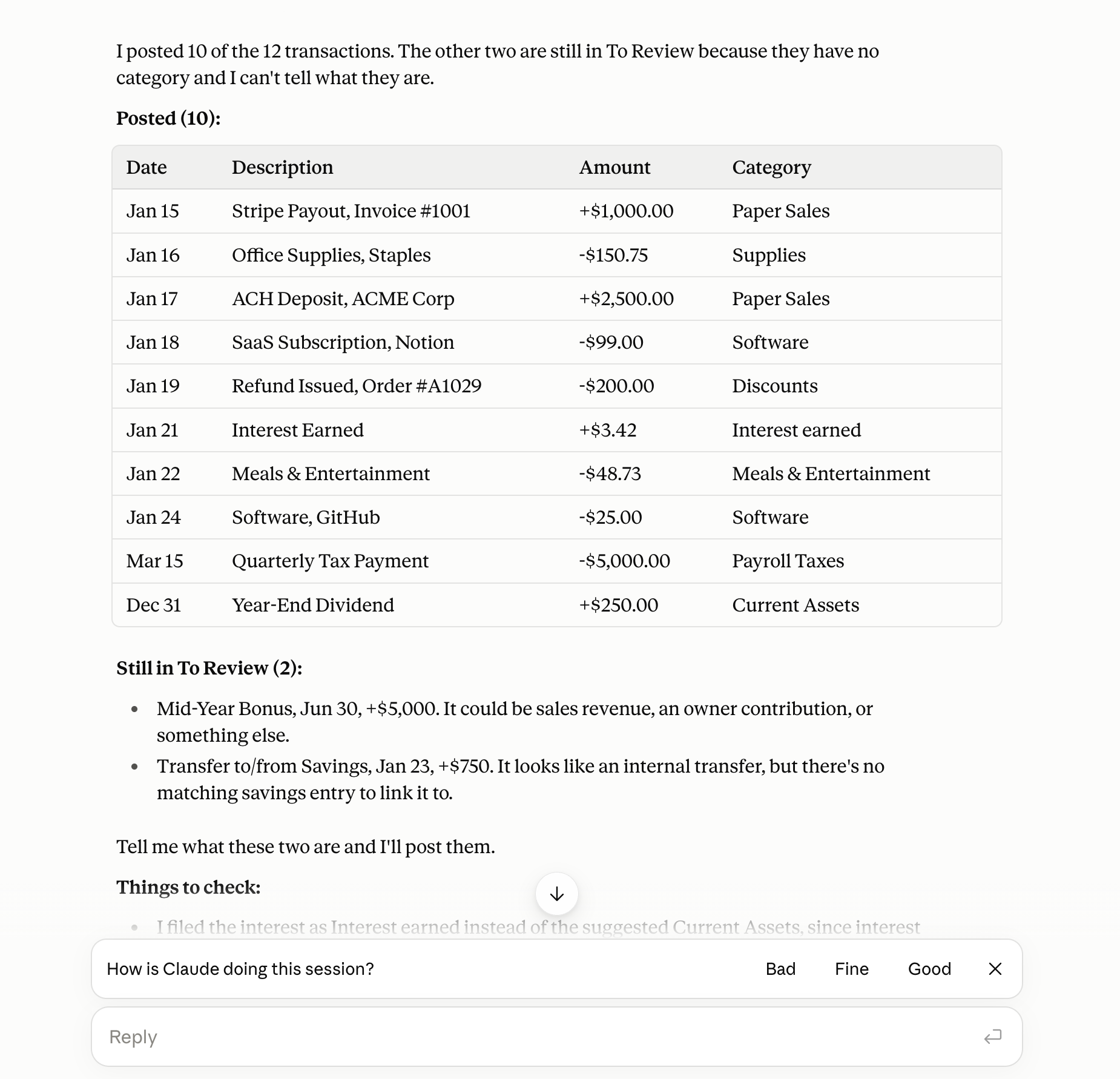
Answer in plain words. "The Home Depot charge on the 14th was a water heater for a job, so it is parts." "Check 2210 was the insurance deposit." "Split the ADP payment into wages, taxes and fees." It posts each one as you answer. Missing a category? Tell it to make one. Got one wrong? Say so and it fixes it, and the fix is recorded like everything else.
Want to watch before you trust it? Connect read-only. It tells you what it would post and why, and you allow changes once the answers look right.
Step 4: Turn the repeat answers into rules
Most of the first batch's questions are questions you will only answer once, and the AI treats them that way. When you say the Ferguson charges are parts, it offers a rule, or you ask for one.
Make a rule: anything from Ferguson is Parts, and post it.
From then on every matching row files itself. Rules can match on the description, the amount or the direction of the money. They can post on their own or hold the row for you to look at. Ten rules after the first month usually cover most of what used to need a decision. By month three the question list is a few lines.
This is the step people skip, and it is why their second month takes as long as their first.
Step 5: Reconcile
Reconciling proves the books match the bank. It is the one step that makes everything else trustworthy, and the step no pasted statement can do. When the statement arrives:
Reconcile the Wells Fargo checking account to the September statement. The ending balance is 8,214.50.
The AI compares the books to that balance and shows a preview. If they match, say yes and it is finished. If they do not, it names the rows that are off, usually a bank fee that never posted or a duplicate, and fixes them when you agree. A finished reconciliation can be undone if you ever need to reopen it. Do this for every account, every month.
Step 6: Run the reports and ask questions
Now the part owners end up liking most.
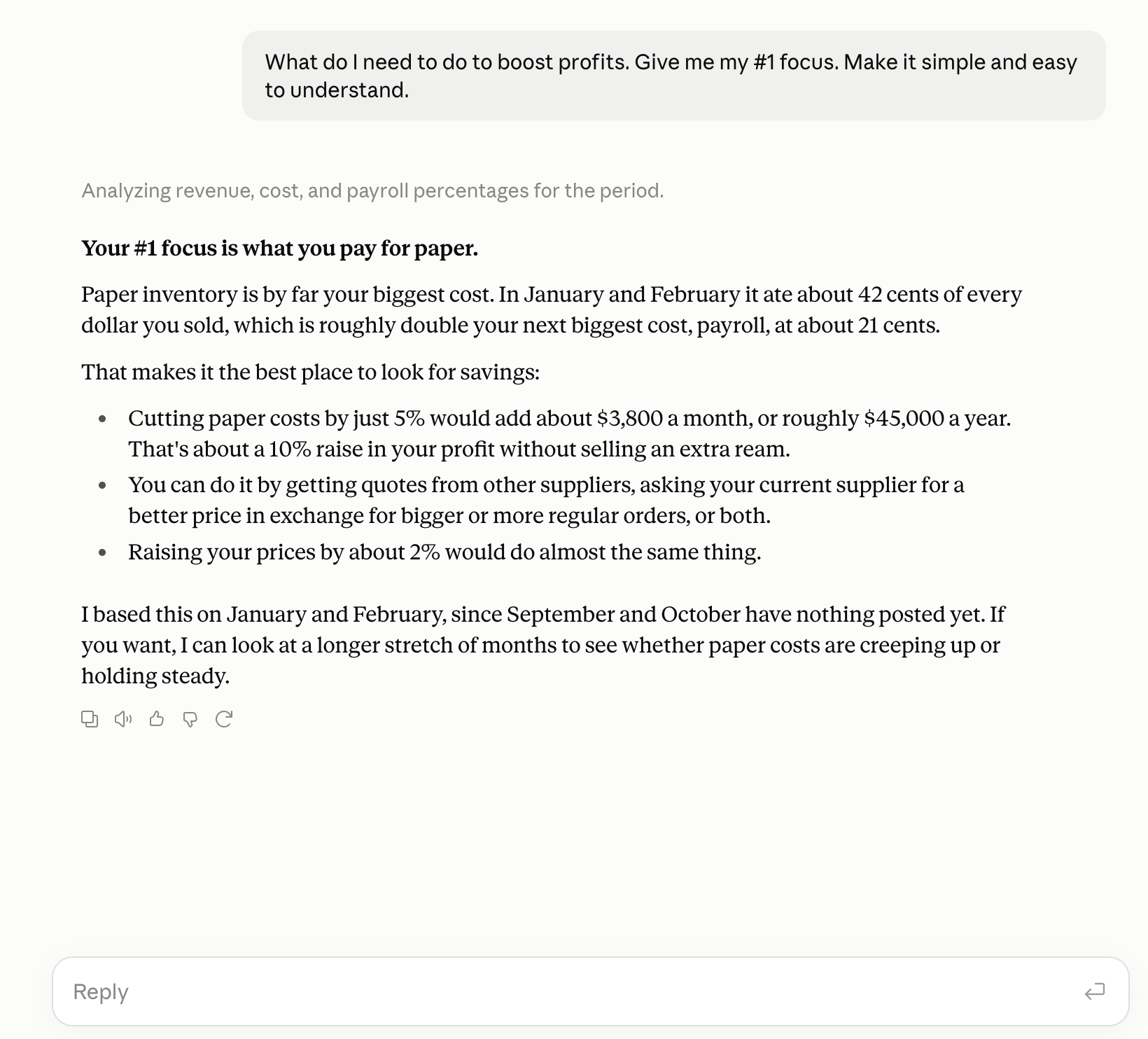
Show me September's profit and loss. Then the balance sheet as of September 30.
Compare this quarter's costs with last quarter. What grew?
Which cost should I look at first?
The books are real and reconciled, so the balance sheet balances and the numbers are the ones you can send to a banker or an accountant. The AI can also open the rows behind every number, so when you ask why something moved you get the actual transactions, not a guess.
How to check its work
You do not need to read every row. A reviewing bookkeeper makes three checks, and you can make the same three in a minute.
- The balances match. Ask: "Does each account balance in the books match the bank?" If one is off, the AI names the rows in between, and that is where the missing fee or the duplicate lives.
- To Review is empty. Anything still sitting there is not in your reports yet. Ask what is left and why.
- The P&L looks right at a glance. Read the category list once. A category you do not recognize, a cost that doubled, or income that dropped to zero is worth one question: "Show me the rows behind that."
If all three pass, the month is done. If you want a second set of eyes, give your accountant a login and have them read the same three things.
The weekly routine
The first month takes about fifteen minutes plus whatever history you decide to clean up. After that, this is the whole job.
- Once a week: "Go through To Review. Post what you are sure about and ask me about the rest." Answer the two or three questions.
- Once a month: reconcile each account to its statement, then make the three checks above.
- When something changes: tell it. A new vendor, a new loan, a line of work you dropped. It remembers.
Books kept this way are never more than a week behind. And this September is categorized the same way as last September, which is what makes comparing them worth anything.
Mistakes that make this fail
- Connecting only checking. The transfers will get you. Connect the cards too, and give it the loan schedules.
- Skipping the briefing. Without it the AI asks you everything one row at a time, and you decide it is slow. Ten minutes once saves hours.
- Never reconciling. Books that are not reconciled are a guess that looks like a report. Give it the statement balance every month.
- Treating the chat as the record. The chat is where you talk. The books are the record. That is why this works in ChatGPT, Claude and the app at the same time: they all read the same books.
- Not making rules. Every answer you give twice should have been a rule the first time.
What a person still does
The AI does the sorting, matching and reconciling. A person still does three things. Tax questions, like whether the new van should be expensed or depreciated, are advice, and advice should come from someone who signs their name to it. Year-end still gets a review and a return from an accountant, though clean books make that a short job. And the AI asks when it is not sure, so you keep answering. Those answers are what make the books yours.
If you would rather have people run the whole thing, firms do that on Switchbooks too. The books are the same either way. The difference is who is driving.
What it costs
Switchbooks is $25 per month per company, every feature included: bank sync, the Switch agent, rules, reports, reconciliation, and the connections to ChatGPT, Claude, Grok Bot and Cursor. One plan, and a free ten-day trial with no card. For comparison, a bookkeeper doing the same sorting, matching and reconciling by hand usually bills a few hundred dollars a month for a small business, and more when the books are busy. Here is what AI does and what still needs a bookkeeper.
Start here
Try Switchbooks free, connect every account, and say the Step 3 prompt to Switch. If you would rather work from the assistant you already use, the setup guides are short: ChatGPT, Claude, and the rest on the AI assistants page. For the shorter overview with a price comparison, see How to Automate Your Bookkeeping With AI. I also wrote a companion guide on my own site for someone who has not picked a tool yet. The books are not going to catch themselves up either way. Hand them over.
More in AI bookkeeping
How to automate your bookkeeping with AI: connect every account, let an AI agent post and reconcile, answer its questions, and turn answers into rules.
Can ChatGPT do your bookkeeping? With a pasted statement, only partly. Connected to real books through the Switchbooks plugin, yes. Here is both.
ChatGPT cannot see your bank on its own. With the Switchbooks plugin it works from a live bank feed and real books. Three ways people try, and the one that works.