If you are 6 to 12 months behind, catch up in this order: bring in every bank and card transaction for the missing months, let AI post the clear ones in bulk, answer its questions about the rest, add payroll and loan entries from your own documents, then reconcile each account month by month. Published catch-up prices, as of October 2026, run $200 for each month behind at Merritt Bookkeeping, from $295 a month at Xendoo, and from $1,000 at Bookkeeper360. Switchbooks is $25 a month per company with no charge for past months.
I ran a bookkeeping firm for about eight years before building Switchbooks. This is the order a careful bookkeeper follows, made faster with AI.
How do I catch up when I'm months behind?
Work forward from the last month you trust, and finish each step for every account before starting the next. Pick a start date first: usually January 1 of the year you need to file, or the first day after the last month your books were right. Then gather the documents listed below.
- Connect every account with the start date set back.
- Import statements where the bank history stops.
- Let the AI post what it is sure of, and answer its questions about the rest.
- Book what the bank cannot show: payroll and loans.
- Reconcile each account, oldest month first.
- Check the books and send the reports to your CPA.
Reconciling before every row is in means reconciling twice.
What catch-up bookkeeping costs
As of October 2026, published catch-up prices run $100 to $200 for each month behind at Merritt Bookkeeping, from $295 a month at Xendoo, and from $1,000 at Bookkeeper360.
| Service | Published catch-up price, as of October 2026 | 12 months behind |
|---|---|---|
| Merritt Bookkeeping | $200 for each month behind; $100 for a month with fewer than 20 transactions to enter | $1,200 to $2,400 |
| Xendoo | From $295 a month | Not listed |
| Bookkeeper360 | From $1,000 for catch-up and prior-period cleanup | Not listed |
| Switchbooks | No catch-up fee; $25 a month per company | No extra charge |
Prices are from each provider's own pricing page, checked October 26, 2026.
The comparison is not one to one. Those services include a person who does the work and asks you the questions. With Switchbooks, the AI does the posting, matching and reconciling, and you answer the questions yourself. The price is the same whether you bring in one month of history or two years. A CPA's tax return is a separate cost either way. For the longer comparison, see what AI does and what still needs a person.
What do I need to gather?
You need a login for every account, a statement for every month, and the documents a bank feed cannot show.
- Logins for every business bank and credit card account. You sign in on Plaid's own page. Switchbooks never sees the password.
- A statement for each account for each month. Download them as PDFs from each bank's website, including card statements. For an account you have closed, ask the bank.
- Payroll registers for every pay date, from Gusto, ADP or whoever runs your payroll.
- Loan statements or the lender's schedule for each loan, including vehicle and equipment loans.
- Last year's tax return or the last balance sheet your CPA prepared, so your starting balances match what was filed.
- A short list of what a stranger would get wrong, like the monthly transfer to your personal account or the loan from your brother.
- Your QuickBooks Online exports, if the months before you fell behind are in QuickBooks. Switchbooks imports the Vendor Contact List, Account List and Journal report. More on that in the QuickBooks alternative guide.
Step 1: Connect every account and set the start date back
A new connection starts on the first of last month unless you pick another date, so for catch-up, change it. When you connect, choose Last month, 3 months, 12 months or Jan 1, or pick any date up to 730 days back, about two years.
How much history actually comes is up to each bank. Recent rows usually arrive within minutes and older history within an hour. Ask Switch, the AI bookkeeper in Switchbooks, for the earliest date each account received. If an account is already connected with too short a window, ask Switch to move its start date earlier, and the next sync asks the bank for more.
Connect the credit cards too, not only checking. When both sides of a card payment or a move to savings are in and can only match each other, Switchbooks links them as a transfer and posts them on its own, so nothing counts twice.
Step 2: Import statements where the bank history stops
Where the connection cannot reach, import the bank's own files: PDF statements, CSV, Excel (.xlsx), or OFX, QFX or QBO downloads, up to 8 files at a time. You do not map any columns.
Drop the files into the Switchbooks chat. Switch shows a preview before anything is created. A row already in the account with the same date, amount and sign stays out, so a statement that overlaps the bank feed does not add anything twice. For an account you closed, or a bank Plaid does not support, Switch creates a non-connected account and the statements go there.
Each account also needs a starting point: the statement balance on the day before its first row. Skip this when a QuickBooks import already brings the earlier history, or the balance counts twice. Otherwise give Switch that number and he books it as the account's opening entry.
Step 3: Let Switch post in bulk and ask about the rest
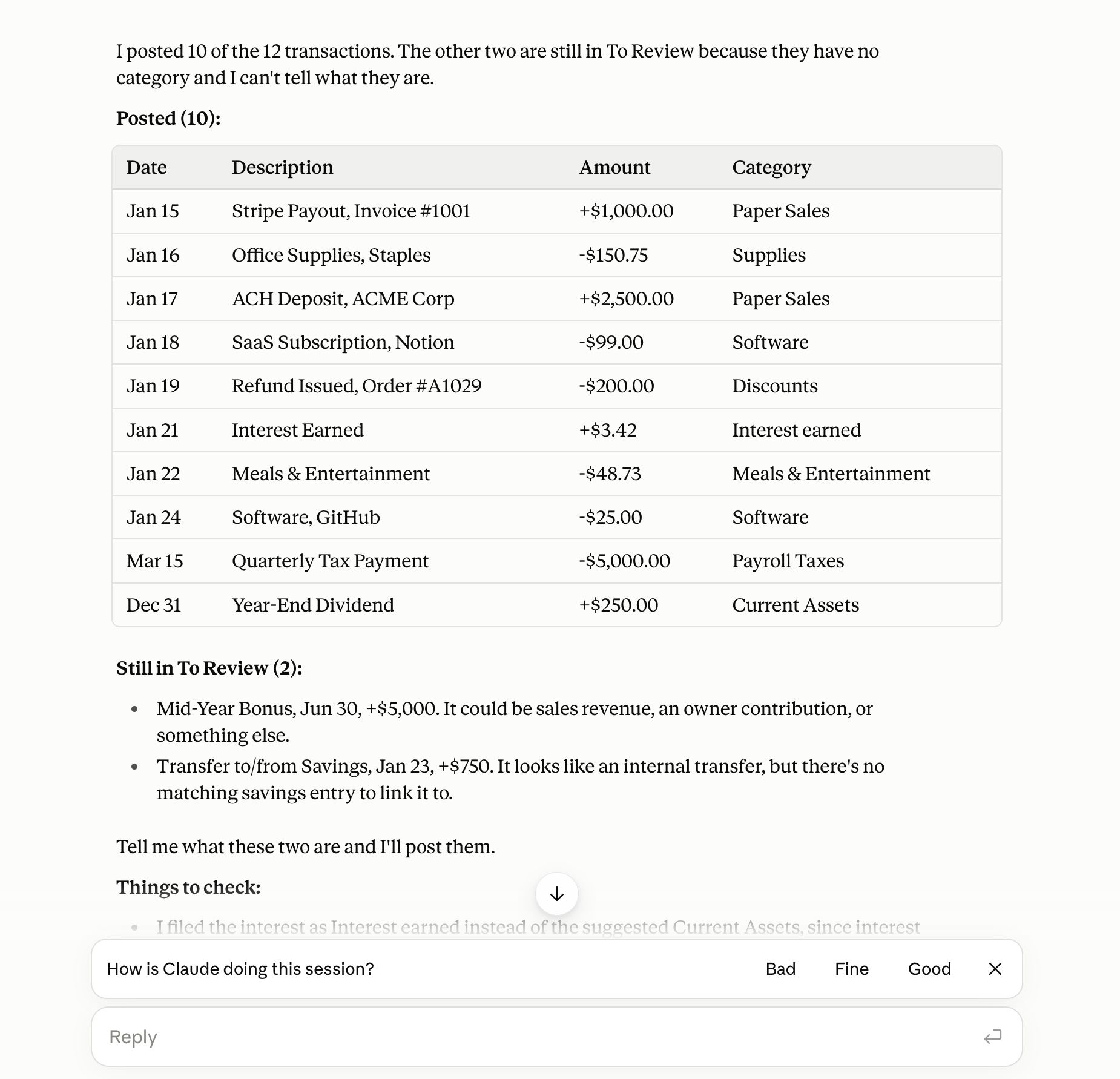
First, tell Switch about the business in a few sentences: what you sell, how you get paid, your main costs, and the list of things a stranger would get wrong. Then say "Do my books." He posts every row he is sure of and asks you about the rest.
What is left is the list a good bookkeeper would also have asked you about. A new vendor. A large deposit. A check with no payee. Answer in plain words and he posts each one. When you give the same answer twice, have him make it a rule, and every month's rows from that vendor are filed the same way.
ChatGPT and Claude, connected to Switchbooks with changes allowed, can do the same posting and reconciling on the same books.
Step 4: Book payroll and loans from your documents
The bank shows net pay and one loan payment a month. It does not show gross wages, withholdings, or how much of the payment was interest. Those details come from you. Do this before reconciling, because the net pay row is matched to the payroll entry, not posted on its own.
- Payroll. Switchbooks does not run payroll. Send Switch each payroll register and he books it as one journal entry on the check date, with wages, employer taxes and withholdings, and matches the net pay row in the bank feed to it. Without the registers, wages on your P&L are understated.
- Loans. Loans cannot be connected accounts. Send Switch the lender's schedule and he splits each payment into principal and interest to the cent, after booking the loan's opening balance.
Step 5: Reconcile month by month
Reconcile each account against its statements, oldest month first. Give Switch the account, the statement end date and the ending balance, or just the statement file.
Several statements of one account can be reconciled in one step. Switch works through them in date order, and each one finishes only if it ties. The first one that does not tie stops the rest, and Switch says why, such as a bank fee or a deposit not in the books yet. Import that statement, post the new rows, and run it again.
For connected checking and savings accounts, a new connection brings the bank's statements for about the last 3 months when the bank offers them. Older months and every card statement come from you.
Step 6: Check the books, then send them to your CPA
Finished means three things. Every account is reconciled through the last month. Nothing is left in To Review. And the profit and loss looks right when you read it once.
Then run the Profit and Loss and Balance Sheet for each month and the year. Invite your CPA as an Accountant so they can read the same books, or export the reports to Excel.
Can AI catch me up before tax time?
Yes, if your documents arrive in time. The AI work is the fast part. Collecting statements, payroll registers and loan schedules, and answering questions, takes longer.
For calendar-year 2026 books, S corporation and partnership returns are due March 15, 2027. C corporation returns and individual returns, including a sole proprietor's Schedule C, are due April 15, 2027. An extension gives more time to file, not more time to pay. Ask your CPA when they need the books, and plan to finish a few weeks before that.
How long does it take?
The documents set the pace, not the AI. Connecting takes one sitting, and bank history usually arrives within an hour. One request starts the posting, and a year of rows may take a few more. Reconciling is quick when statements tie, and when one does not, Switch says why.
If you have every statement, register and schedule on day one, a 6 to 12 month catch-up is a few working sessions. If you are waiting on a closed account's statements or a payroll provider's reports, that wait sets the pace.
What AI cannot do for you
Knowing the limits now saves a surprise at tax time.
- Banks decide how much history they send, up to two years. Older months come from statement files.
- Statements through the connection cover about 3 months. Older ones and card statements come from you.
- Payroll and loan details come from your documents. The AI will not guess gross wages or interest.
- Your CPA still files the taxes. Switchbooks does not prepare or file tax returns, 1099s or sales tax. It also has no payroll, invoicing, bill pay or inventory.
Start here
Try Switchbooks free for 10 days with no card, connect every account with the start date set back, and say "Do my books." Pricing is on the pricing page: $25 a month per company. Once you are caught up, How to Have AI Do Your Bookkeeping shows the weekly routine that keeps you from falling behind again.
Related reading
How to automate your bookkeeping with AI: connect every account, let an AI agent post and reconcile, answer its questions, and turn answers into rules.
How to have AI do your bookkeeping in six steps: connect every account, brief the AI, let it post, make rules, reconcile, run reports. With the exact prompts.
Two ways to use ChatGPT for bookkeeping: paste a statement with the right prompts, or connect it to your books through a plugin. Steps, prompts, limits.