No, not on its own. ChatGPT cannot sign in to your bank, cannot pull your transactions and does not keep a ledger from one chat to the next. Yes, if ChatGPT is connected to bookkeeping software that holds the bank feed. Since October 2026 that is a three-minute setup through the Switchbooks plugin in the ChatGPT plugin directory. Your bank connects to Switchbooks through Plaid, and ChatGPT reads and posts the transactions from there.
In short:
- ChatGPT alone has no bank login, no bank feed and no books. Its Finances feature is a personal spending tool, not business bookkeeping.
- Pasting a CSV into ChatGPT gets categories for one account and nothing else: no transfers matched, no reconciliation, no memory next month.
- The route that works: connect the bank to Switchbooks through Plaid, then connect ChatGPT to Switchbooks through the plugin.
- Connected, ChatGPT can categorize, post, match transfers, reconcile, make rules, book journal entries and run reports in real books.
- The bank sign-in happens on Plaid's screen. ChatGPT never sees a bank password and nothing in the chain can move money.
- $25 a month per company, everything included, 10-day free trial with no card. Works on ChatGPT Free, Go, Plus and Pro.
I ran a bookkeeping firm for eight years and grew it to forty people before building Switchbooks. "Can ChatGPT connect to my bank?" is now one of the first questions owners ask me, and it is the right question. Where the bank feed lives decides whether an AI can do your books or only talk about them. Here are the three ways people try, what breaks in each, and the one that works.
Why can't ChatGPT see my bank account?
ChatGPT is a chat. It has no bank login, no bank feed and no books. When you ask it to look at your checking account, the honest reply is that it cannot. ChatGPT's own Finances feature does link personal bank and card accounts, but it is a personal finance tool for tracking spending. It is not a ledger, and it will not produce a profit and loss you could hand to your accountant.
So the question becomes: how do you put a bank feed and a set of books in front of ChatGPT? That is what a plugin does. Switchbooks holds the bank connection and the ledger. ChatGPT, through the plugin, gets tools to search the transactions, categorize and post them, match transfers, reconcile and run reports. The bank talks to Switchbooks. ChatGPT talks to Switchbooks. The two never touch each other directly, which is also why your bank password never gets near a chat.
The three ways people try
| Sees the bank | Posts to books | Matches transfers | Reconciles | Remembers next month | |
|---|---|---|---|---|---|
| Ask ChatGPT to look at the account | No | No | No | No | No |
| Paste a CSV into ChatGPT | One account, one month | No | No, sees one side | No | No |
| Bank into Switchbooks, ChatGPT into Switchbooks | Every account, live | Yes | Yes | Yes, from a preview | Yes, in the books |
1. Ask ChatGPT to look at the account
The first thing most people do is type "look at my Chase account and categorize last month." ChatGPT says it cannot access bank accounts and usually suggests exporting a statement. Some people get as far as the Finances feature, link a personal card, and find a spending breakdown with no way to post, split, match or reconcile anything. That feature answers "where did my money go this month," not "are my books done."
What breaks: nothing happens. There is no feed, so there is nothing to work from.
2. Export a CSV and paste it in
This is the route that looks like it works. Download the month from your bank, paste it into the chat, and ask ChatGPT to categorize. It will, and the categories for obvious vendors will be fine.
What breaks is everything after the first step. ChatGPT sees one account, so the $3,200 leaving checking to pay the card becomes an expense, the card charges are expenses too, and your costs are doubled. It cannot reconcile, because the statement is all it has and there is nothing to reconcile it against. And next month it remembers none of this, so you explain the rules again or accept that March and April were categorized differently. I went through ten real rows two ways in Can ChatGPT do my bookkeeping. The two transfers alone were $13,200 of error in one month.
If you are going to do this anyway, paste every account at once and ask for transfers first. The prompt is in How to use ChatGPT for bookkeeping. It gets you to roughly right, with most of the work still yours.
3. Connect the bank to books, and ChatGPT to the books
This is the one that works, and the rest of this post is about it. The bank feed goes into Switchbooks through Plaid, which covers US banks and credit cards. New transactions arrive on their own and land in To Review with a suggested category and payee. A transfer between two of your own accounts is linked and posted on its own once both sides arrive and can only match each other. ChatGPT, connected through the plugin, works from that feed and those books.
The same questions that failed in the first two routes now come out differently. Ask about the $3,200 leaving checking and ChatGPT finds the $3,200 arriving at the card, linked as a transfer, with no entry to make. Ask it to reconcile checking to September's statement and it compares the ledger to the bank, shows the rows that do not match, and finishes when you say yes. Ask for the P&L and it runs the real report, every account included.
How do I connect ChatGPT to my bank through Switchbooks?
Three parts. The bank into Switchbooks, ChatGPT into Switchbooks, then the first ask.
1. Connect the bank to Switchbooks. Sign up, set up your company, and connect the bank from the Banking page, or tell Switch, the agent inside Switchbooks, to connect your bank. Either way Plaid's sign-in screen opens. You sign in to the bank there, pick the accounts, and the transactions start arriving. Switchbooks reads transactions, balances and statements and nothing else. It cannot move money. If your bank is not on Plaid, or you want history from before the feed, import a file: CSV, Excel, a PDF statement, or an OFX, QFX or QBO download from the bank's site.
2. Connect ChatGPT to Switchbooks. Open Switchbooks in the ChatGPT plugin directory and click Install plugin. Sign in to Switchbooks and you land on the permission screen.
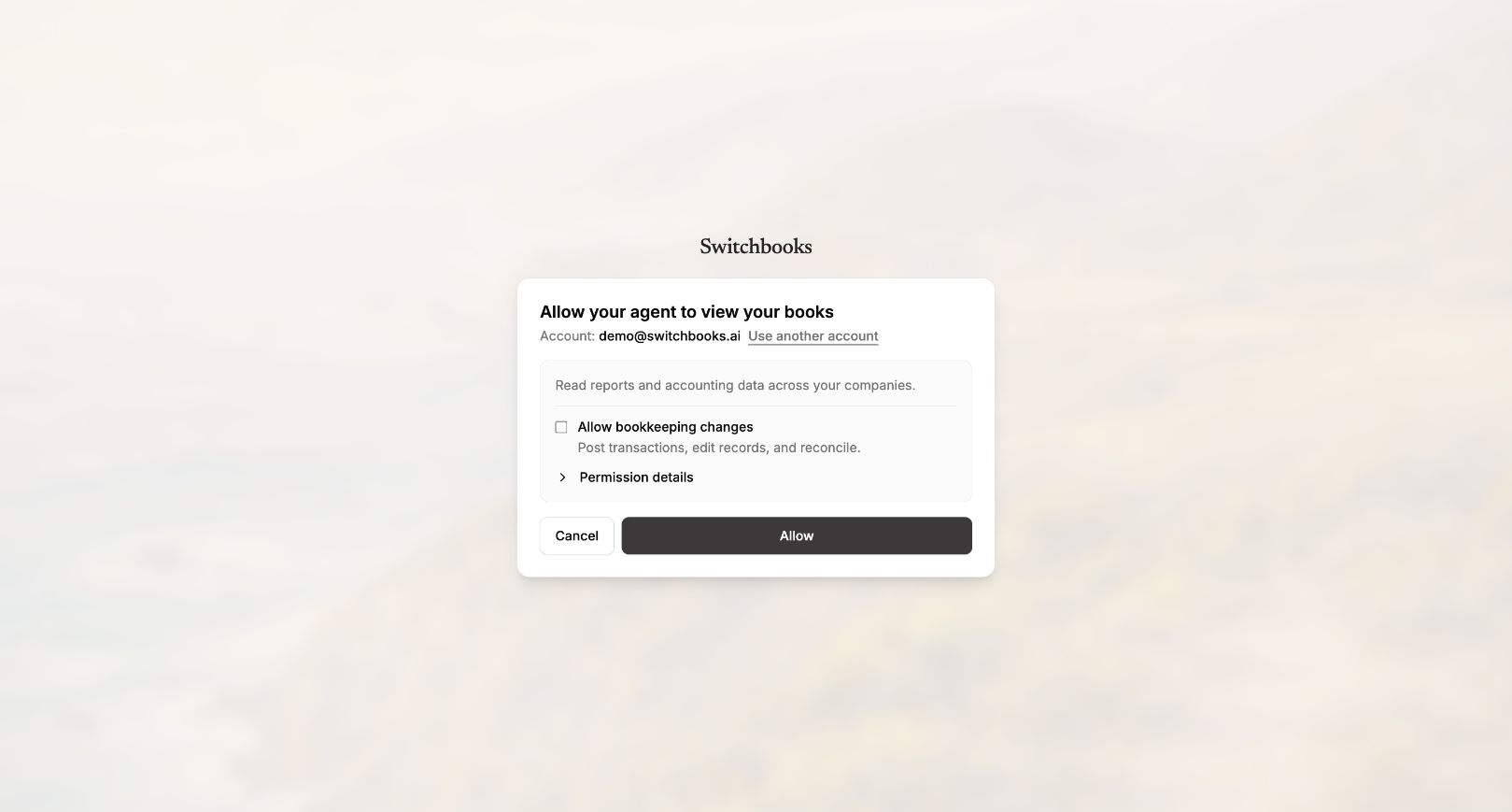
Keep Allow bookkeeping changes ticked if you want ChatGPT to post, match and reconcile. Untick it for a read-only connection that can search and run reports but change nothing. Click Allow. You can change your mind later by disconnecting from either side.
3. Ask. In a chat, type @switchbooks and a question. "List my Switchbooks companies" is a good first one if you have more than one. Then "What is sitting in To Review?" or simply "Do my books."
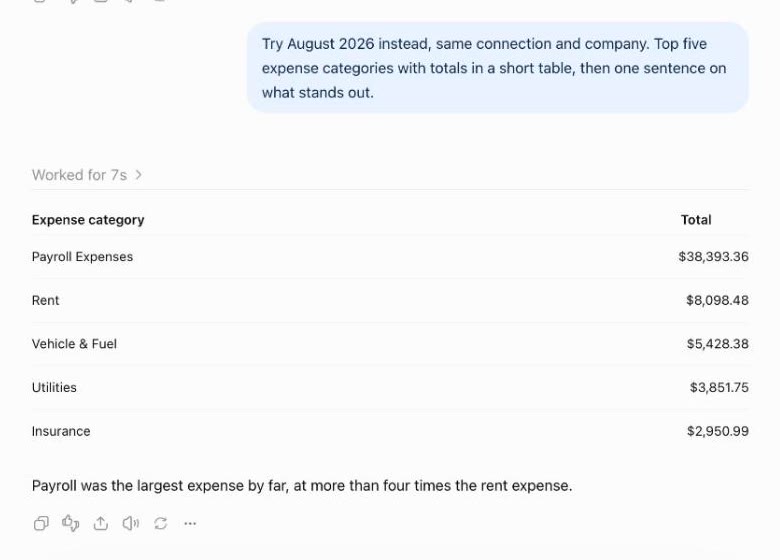
One detail worth knowing. The bank connection itself happens in the Switchbooks app, not in the ChatGPT chat. Connect the bank first, then install the plugin, and the order takes care of itself. If you install the plugin first, the Switchbooks connect screen offers Sign up, walks you through the company and the bank, and brings you back to click Allow. If ChatGPT has stopped waiting by then (assistants give up after about ten minutes), open the listing and connect again. Claude, Cursor and Grok Bot can send you a one-time Plaid link from inside the chat, so with those assistants both steps happen in one place.
What can ChatGPT do once it is connected?
With changes allowed:
- Categorize and post the transactions in To Review, one at a time or a month at once, and split a row across categories.
- Match transfers between your own accounts, so a card payment or a move to savings is never counted as income or expense.
- Reconcile an account to a statement from a preview, and set opening balances.
- Make rules from the decisions you repeat, so next month's Shell charge is fuel without anyone asking.
- Book journal entries, such as splitting the Gusto run into wages, taxes and fees.
- Run reports: Profit and Loss, Balance Sheet, Cash Flow, trial balance, and the entries behind any number.
- Undo most of its own changes when you ask what it did and tell it to put it back.
Read-only: search transactions, list categories, payees, rules and accounts, and run every report.
What can't ChatGPT do, even connected?
- Sign in to your bank. Nothing in the chain can. The sign-in is on Plaid's screen, and Switchbooks only reads bank data.
- Move money. There is no tool for it and no way to add one.
- Connect a bank or import a file from the chat. Those happen in the Switchbooks app when you use ChatGPT. Claude, Cursor and Grok Bot can do both from the chat.
- Invite people, share reports, change billing or delete a company. Those stay with the people in the Switchbooks app.
- Work between chats. ChatGPT only acts in a chat where you ask it to. Rules you set, matched transfers, and the weekly books check if you turn it on can post new transactions without you, but ChatGPT itself does nothing until you type.
What does it cost, and where does the data go?
Switchbooks is $25 a month per company with every feature and every assistant connection included, and a 10-day free trial with no card. The plugin works on ChatGPT Free, Go, Plus and Pro. In a Business or Enterprise workspace an admin controls plugins.
Your books live in Switchbooks, not in ChatGPT. What ChatGPT reads through the plugin is the answer to each question you ask, not your whole bank feed. OpenAI says it may use what ChatGPT reads from plugins to improve its models on Free, Go, Plus and Pro when Improve the model for everyone is on, and you can turn that off in ChatGPT's data controls. Because the books are not in the chat, turning it off costs you nothing.
To disconnect, remove Switchbooks under Settings, Plugins in ChatGPT, or under Settings, MCP, Connected apps in Switchbooks. The bank connection and the books stay where they are.
What if I use Claude, Cursor or Grok Bot instead?
The same connection is in the Claude directory, the Cursor marketplace and the Grok Bot plugin marketplace, and it works in any MCP client. Those assistants can also connect the bank from the chat: with changes allowed, they send you a one-time Plaid link that works for 25 minutes, you sign in on your phone or computer, and the accounts you pick come in. The connect tutorial has the steps for every assistant, and the Claude walkthrough has screenshots.
Key facts
| Can ChatGPT connect to a bank on its own | No |
| How ChatGPT gets a business bank feed | Switchbooks plugin from the ChatGPT plugin directory |
| How the bank connects | Plaid, US banks and credit cards, sign-in on Plaid's own screen |
| Without a supported bank | Import CSV, Excel, PDF statements, or OFX, QFX or QBO files |
| Where the bank is connected when using ChatGPT | In the Switchbooks app, not the chat |
| Who can connect a bank from the chat | Claude, Cursor, Grok Bot and other MCP clients, via a one-time Plaid link |
| What ChatGPT can change | Categorize, post, split, match transfers, reconcile, rules, journal entries, undo |
| What it can never do | Sign in to a bank, move money, invite people, share reports, change billing |
| Price | $25 a month per company, everything included |
| Trial | 10 days, no card |
| ChatGPT plans | Free, Go, Plus and Pro; Business and Enterprise through an admin |
| Disconnect | ChatGPT Settings, Plugins; or Switchbooks Settings, MCP, Connected apps |
The one-sentence version
ChatGPT cannot connect to your bank, and it never needs to. Connect the bank to Switchbooks, connect ChatGPT to Switchbooks, and the assistant you already use is working in real books from a live bank feed. Try Switchbooks free, connect a bank, install the plugin, and ask what is sitting in To Review.
Related reading
How to automate your bookkeeping with AI: connect every account, let an AI agent post and reconcile, answer its questions, and turn answers into rules.
How to have AI do your bookkeeping in six steps: connect every account, brief the AI, let it post, make rules, reconcile, run reports. With the exact prompts.
Two ways to use ChatGPT for bookkeeping: paste a statement with the right prompts, or connect it to your books through a plugin. Steps, prompts, limits.